
Overview | Orientation | Tasks

 Previous
|
Next
Previous
|
Next 
Home Information
This page displays all the home information that is on file for you in Company Contacts. You can edit this information yourself.
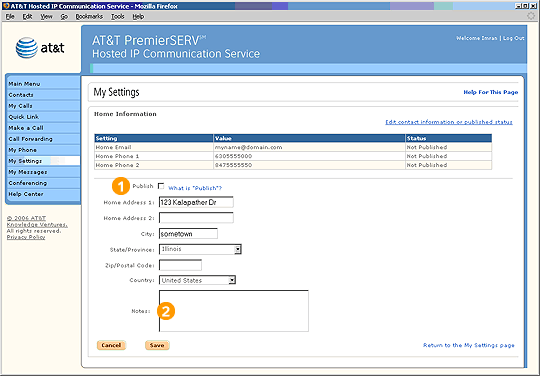
 Be sure to periodically verify the accuracy of the home information in your profile, especially if you move. If any information is incorrect, you can enter correct information into the fields on this page.
Select the "Publish" checkbox if you would like your home information to be published.
Highlights

If you choose to publish your home information, other people in your company can find it by searching Company Contacts. The default setting is "Not Published," which means that other Employees will not be able to view your home information. You must specifically choose to have your home information published.

The notes section is helpful for miscellaneous information, such as special package delivery instructions or times of day when you can be reached at home.
Related Pages
Previous
|
Next