
Overview | Orientation | Tasks

 Previous
|
Next
Previous
|
Next 
My Settings
The My Settings page gives you access to pages where you can view and edit your profile in Company Contacts, change your password, or view Billing Codes.
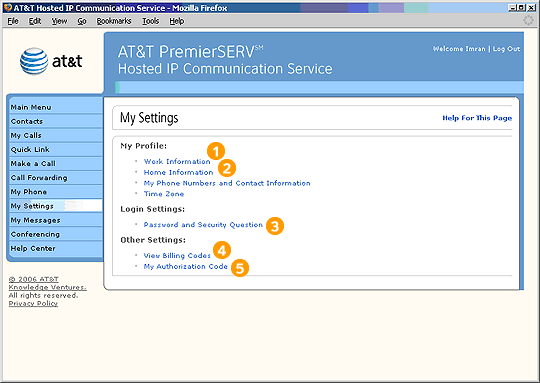
 Your Office Administrator entered all of your information into the Company Contacts list. This information is what constitutes your Employee profile. As an Employee, you can edit portions of your profile by yourself. Other parts of your profile can only be changed by your Office Administrator.
Select any of these links to go to the corresponding HIPCS screen.
Highlights

You can select "Work Information" to view the information in your work profile, but only your Office Administrator can edit your work profile.

You can edit the information contained in the "Home Information," "Phone Numbers and Other Contact Information," and "Time Zone" portions of your profile.

A password is needed every time you log in to HIPCS. If you forget your password, the security question is a way for HIPCS to verify your identity. If you answer it correctly, HIPCS will issue you a new password via your work email address.

The Billing Codes page lists the available billing codes you can assign to calls you make. Your use of these codes is either mandatory, optional, or not applicable, depending on your company's policies and the dialing privileges the Office Administrator has set for you.

Your Office Administer may have assigned you an Authorization Code (or PIN) to allow you to make external calls from phones normally restricted to dialing internal extensions. My Authorization Code allows you to view or reset this 4 to 6 digit numeric code. This link will appear only if the Office Administer has granted you use of these codes.
Related Pages
Previous
|
Next