
Overview | Orientation | Tasks

 Previous
|
Next
Previous
|
Next 
My Phone Numbers and Other Contact Information
This page is used to view and change phone numbers and email addresses in your profile.
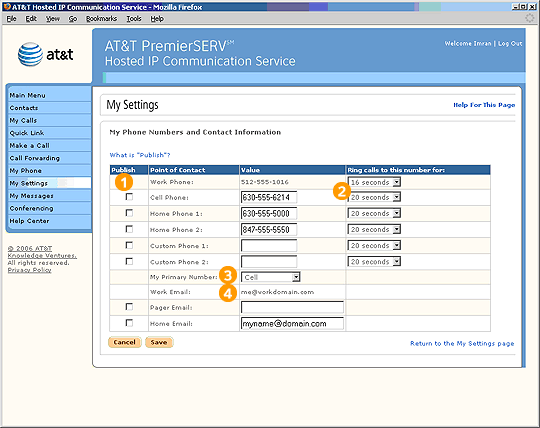
 Be sure to periodically verify the accuracy of the information in your profile, especially if you move. If any information is incorrect, you can enter correct information into the fields on this page.
Choose which information you would like to be published by selecting the appropriate checkboxes.
If you would like a phone number other than Work to be your primary phone number, choose another number from the pull-down menu.
Highlights

If you choose to publish your home information, other people in your company can find it by searching Company Contacts. The default setting is "Not Published," which means that other Employees will not be able to view this information. You must specifically choose to have this information published.

One ring cycle is equal to approximately five seconds. Therefore, a ring time of "20 seconds" would correspond to about four rings.

You can select which number appears by default beside your name in the Company Contacts list. For example, you may prefer that co-workers call your cell phone because you are usually in the field or away from your desk.

Only your Office Administrator can edit your work email address.
Related Pages
Previous
|
Next