
Overview | Orientation | Tasks

 Previous
|
Next
Previous
|
Next 
Phone Templates
The Phone Templates page displays information about all of your company's Phone Templates.
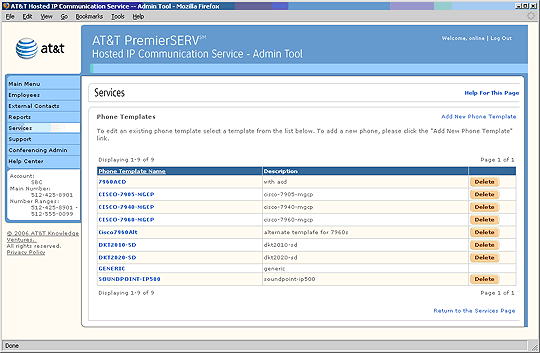
 Phone Templates let you define the types of telephones used by your company and assign certain calling features to the programmable keys on the telephones. You can create multiple Phone Templates that pre-program keys with specific features and speed dial numbers. Later, you can assign the Templates to specific Employees, based on how they use their phones.
Select a Phone Template name to view and edit information about it.
Select an underlined column header to sort the entries by that column. Selecting the header again will reverse the order.
If a new phone template is enabled after the tenant was created, the Office Administrator will need to manually add this new template to their phone template list. The phone template list will not be updated automatically for existing tenants.
Select Add New Phone Template to add a new IP phone or configuration to the Phone Templates list.
Tip: If you do not want to pre-assign keys on the telephone, you do not need to create Phone Templates. HIPCS automatically detects the phone type when extensions are added and assigns Employees the "Generic" Template by default.
Related Pages
Previous
|
Next