Learn about optical network terminal status lights
You can use the status lights on your optical network terminal (ONT) to help find and fix internet issues. An ONT may also be called a Service box.
Indoor 010
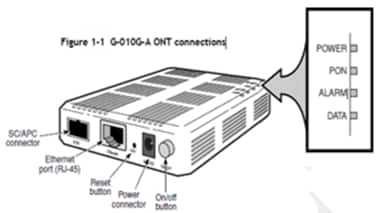
If you’re having issues and can’t get your ONT to power up, contact us.
| Status light | State | Description and action needed |
|---|---|---|
| POWER | Green (solid) | The ONT is on. |
| Off | The ONT is off. You should:
| |
| Red | There’s a problem with the ONT. | |
| PON | Green (solid) | The ONT is connected to the AT&T network. |
| Green (flashing) | The ONT is connecting to the AT&T network. | |
| Off | You should:
| |
| ALARM | Off | The ONT is working properly. |
| Red (solid) | The ONT isn’t working as expected. Make sure the fiber cable is connected to the PON port. | |
| DATA | Off | The Ethernet isn’t working. You should:
|
| Green (Solid) | The ONT is connected to your gateway at 10 or 100Mbps. | |
| Green (flashing) | The ONT has data activity at 10 or 100Mbps. | |
| Yellow (Solid) | The ONT is connected to your gateway at 1000Mbps. (Service speed may vary) | |
| Yellow (Flashing) | The ONT has data activity at 1000Mbps. (Service speed may vary) |
Indoor 020
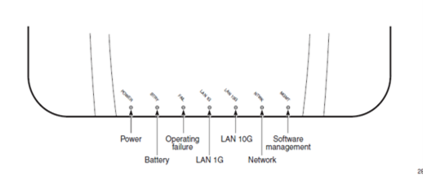
If you’re having issues and can’t get your ONT to power up, contact us.
| Status light | State | Description and action needed |
|---|---|---|
| PWR | Green (solid) | The ONT is on. |
| Off | The ONT is off. You should:
| |
| BTRY | Off | This isn’t used for your AT&T internet service. |
| FAIL | Off | The ONT is working as expected. |
| Green (solid) | There’s a problem with the ONT. | |
| Green (flashing) | The ONT is connecting to the AT&T network. | |
| LAN 1G | Green (solid) | The ONT is connected to your gateway. |
| Green (flashing) | The ONT has data activity. | |
| Off | The Ethernet isn’t working. You should:
| |
| LAN 10G | Off | This isn’t used for your AT&T internet service. |
| NTWK | Green (solid) | The ONT is connected to the AT&T network. |
| Off | The ONT isn’t working as expected. | |
| MGMT | Green (solid) | The ONT is connected. |
| Green (flashing) | The ONT is downloading software. | |
| Off | The ONT isn’t connected to the AT&T network. |
Outdoor
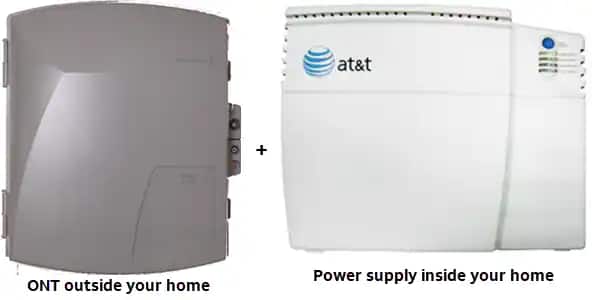
Check to make sure the power supply LED is On and Green. If it isn’t, make sure it’s plugged in to a working outlet.
If it’s plugged in and still not working, contact us.
Last updated: February 14, 2024