No GPS Connection
No GPS Connection
Learn how to troubleshoot if AT&T 5G Cell Booster Pro GPS lock cannot be acquired.
INSTRUCTIONS & INFO

If an AT&T 5G Cell Booster Pro GPS lock cannot be acquired then a 5G connection will not be available.
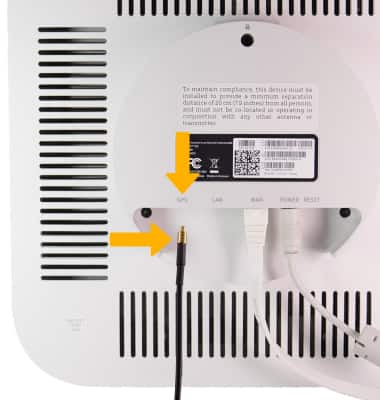
If you are experiencing GPS lock connectivity issues, try re-connecting the included GPS antenna. Insert the gold-side of the GPS cable into the GPS port until it clicks into place. Ensure that the connection is tight. The attached GPS Antenna should be placed near a window and have unobstructed view of the sky.
Note: If you're still experiencing GPS connectivity issues, wait 24 hours to see if GPS connectivity resolves. If the area is far from the router and you need to move the device, considering purchasing the Netgear Powerline.