Contacts
Learn how to add, view, delete, customize by adding a picture or ringtone, and backup your contacts.

In this tutorial, you will learn how to:
Add a contact
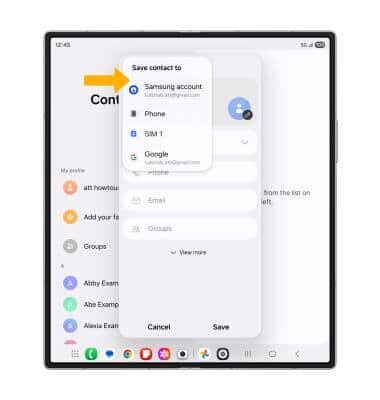
1. Select the  Add icon. Select the desired account you want to save the contact to.
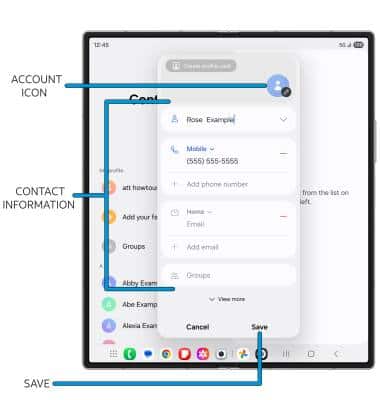
2. Enter the desired contact information in the corresponding fields. To add a picture, select the Account icon then navigate to the desired image. Select Save when finished.
Edit or delete a contact
EDIT CONTACT: Select the desired contact, then select the  Edit icon. Edit the contact as desired, then select Save.
DELETE CONTACT: Select the  Menu icon, then select Delete. Select Move to Trash to confirm.
Add a ringtone
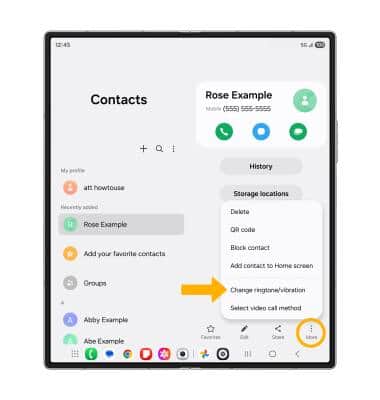
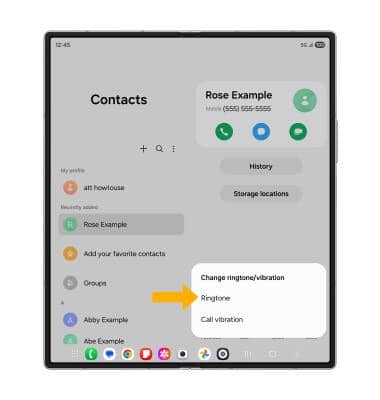
1. From the contact screen, select the More icon, and select Change ringtone/vibration.
2. Select Ringtone.
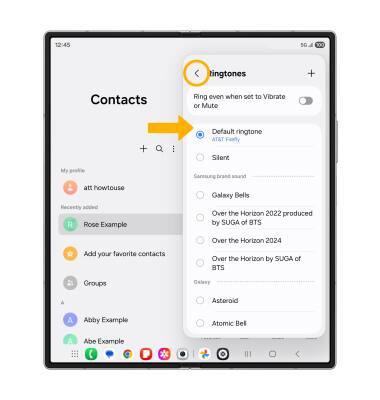
3. Select the desired Ringtone, then select the Back arrow.
Backup your contacts
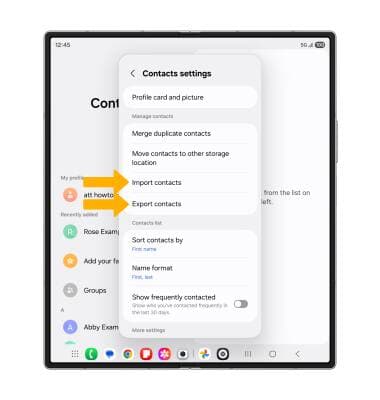
1. From the Contacts screen, select the Menu icon > Settings > Import contacts or Export contacts and follow the prompts.