Software Version
Software Version
Determine your current software version and check for updates.
INSTRUCTIONS & INFO
 Stay current by regularly checking for software updates, which often include important security patches and performance enhancements. Before downloading updates, ensure you’re connected to a reliable Wi-Fi or cellular network for a smooth experience.
In this tutorial, you will learn how to:
• View software version
• Check for updates
• Check for updates
View software version
1. From the Clock screen, swipe left three times then select the  Settings app.
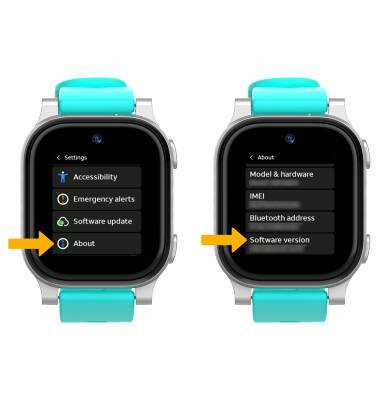
Settings app.2. Scroll to and select About. Scroll down to view the Software version.
Check for updates
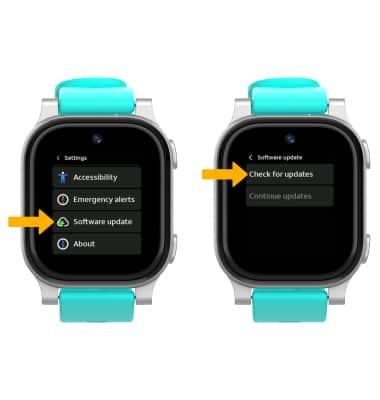
From the Settings screen, scroll to and select Software update, then select Check for updates.
Note: If an update is available, follow the on-screen instructions to perform the update. After an update has been performed, keep checking for another update until no update is found. If an update is not available, select OK.
Note: If an update is available, follow the on-screen instructions to perform the update. After an update has been performed, keep checking for another update until no update is found. If an update is not available, select OK.