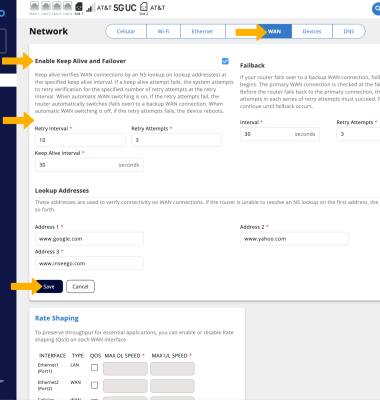
Failover
Keep alive verifies your WAN connections by performing the desired intervals. With automatic WAN switching on, the connection fails over to your backup WAN.
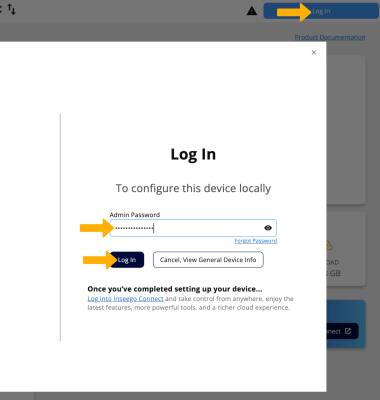
1. Keep alive verifies your WAN connections by performing an NS lookup on lookup address(es) at the keep alive interval. If a keep alive attempt fails (the router is unable to resolve an NS lookup on any of the three lookup addresses), the system retries the connection at the retry interval for the set number of retry attempts. When automatic WAN switching is on, if the retry attempts fail, the connection fails over to your backup WAN connection. When automatic WAN switching is off and the retry attempts fail, the router reboots. These settings are enabled by default. To edit these settings, from your device’s web browser, go to http://inseego.local or https://192.168.1.1. Click Log In. Enter your admin password, then click Log In.
Note: Ensure that your device is connected to your device's Wi-Fi network. For more information, please see the Connect Devices to Wi-Fi or Connect PC or Mac to Wi-Fi tutorials. If this is your first time logging into the Web admin page, the default password will be displayed on the bottom of your device. You will be prompted to change the admin password.
2. Click Network.
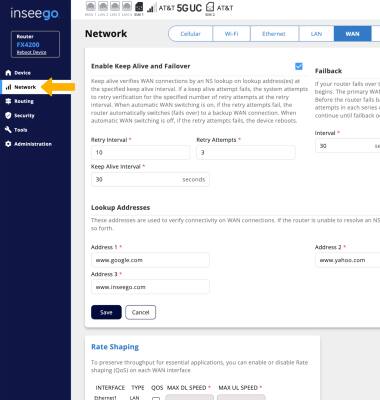
3. Click the WAN tab, then scroll to the Enable Keep Alive and Failover section. Edit the Keep Alive and Failover settings as desired, then select Save.