Block or Unblock Calls
Block or Unblock Calls
Block or unblock calls from your device. Block unknown calls.
INSTRUCTIONS & INFO

When a call is blocked, it is routed directly to voicemail. The call blocking feature may not affect phone calls via third-party apps installed on your device. Contact third party app developers for assistance with such applications.
In this tutorial you will learn how to:
• Block numbers
• Unblock numbers
Block numbers
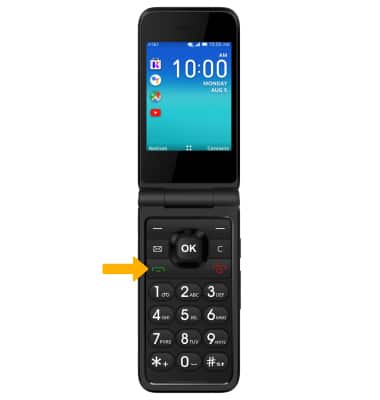
1. From the home screen, press the Place/Answer Call button to access the Call log.
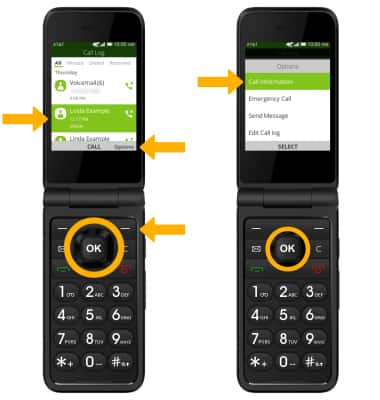
2. Press the navigational buttons to highlight the desired call, then press the right menu button to select Options. Ensure Call Information is highlighted, then press the OK button to select.
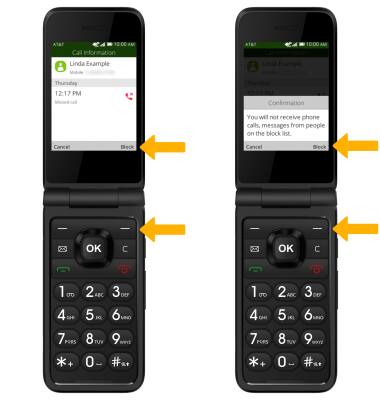
3. Press the right menu button to select Block, then press the right menu button again to select Block to confirm.
2. Press the navigational buttons to highlight the desired call, then press the right menu button to select Options. Ensure Call Information is highlighted, then press the OK button to select.
3. Press the right menu button to select Block, then press the right menu button again to select Block to confirm.
Unblock numbers
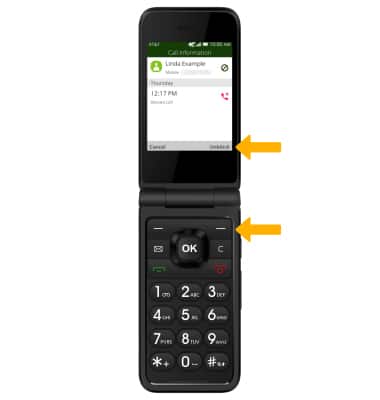
From the desired call, press the right menu button to select Unblock.