Date, Time & Alarm
Date, Time & Alarm
Learn how to set the date, time, and time zone.
INSTRUCTIONS & INFO
In this tutorial, you will learn how to:
• Set the date and time
• Change the time zone
• Set an alarm
• Turn an alarm on or off
• Delete an alarm
Set the date and time
1. From the home screen, select the  Settings app.
Note: The device will automatically attempt to set the date and time from the network. This tutorial demonstrates how to manually set the date and time on your device.
2. Select General, then select Date & Time.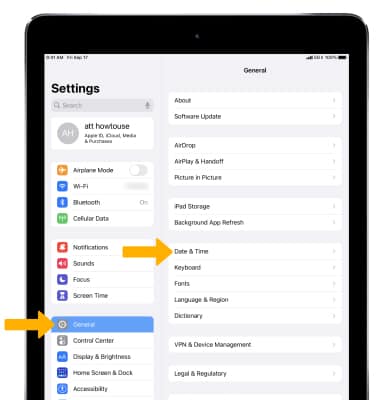
3. To manually change the date or time, select the  Set Automatically switch to place it in the off position.
4. Select the date or time, then set the desired date or time.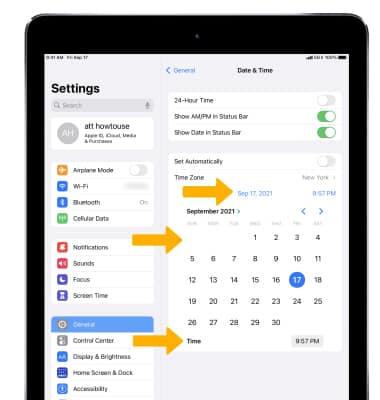
Change the time zone
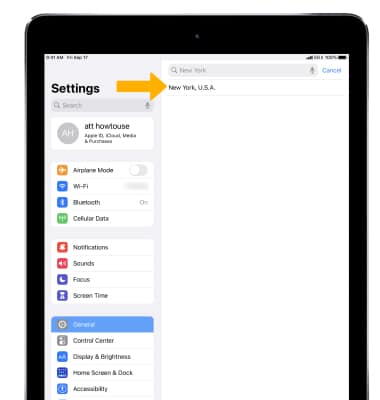
1. To manually set the time zone, select Time Zone.
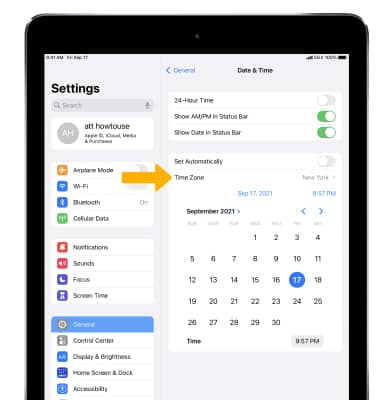
2. Enter and select the desired time zone location.
2. Enter and select the desired time zone location.
Set an alarm
1. To set an alarm, from the Home screen select the  Clock app.
2. Select Alarm, then select the  Add icon. Set desired alarm time and settings, then select Save when finished.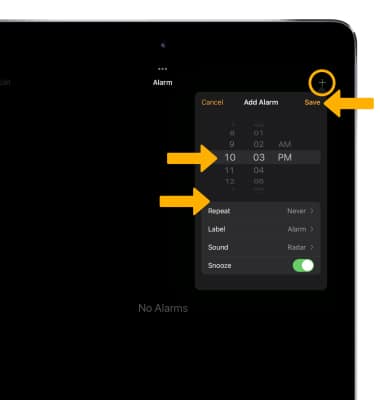
Turn the alarm on or off
To turn on or off an alarm, select the switch next to the desired alarm.
switch next to the desired alarm.Delete an alarm
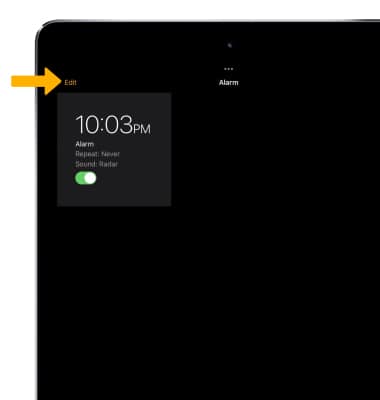
To delete an alarm, select Edit then select the  Remove icon.