
Overview | Orientation | Tasks

 Previous
|
Next
Previous
|
Next 
Main Menu
This is the first page you will see every time you log in to the Admin Tool.
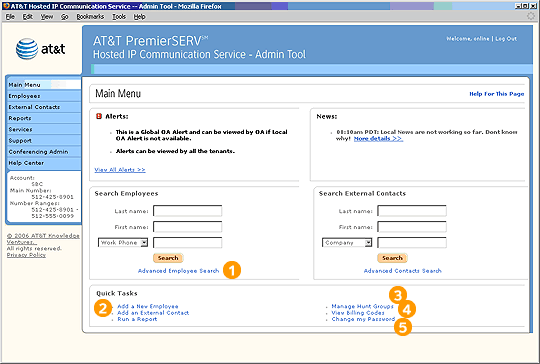
When you log in to the HIPCS Admin Tool, this page displays system alerts and news items.
To find specific Employees, enter information into one or more of the Search Employees fields, then select Search.
 There are three different types of Contacts in HIPCS:
Company Contacts are Employees in your company.
External Contacts are outside contacts like clients and vendors.
Personal Contacts are people in Employees' individual contact lists.
To find specific External Contacts, enter information into one or more of the Search External Contacts fields, then select Search. If you enter criteria in more than one field, HIPCS will return results that match all of the criteria (an "and" serach).
Quick Tasks lets you link directly to the most common features of the Admin Tool.
Highlights

Advanced Search for Employees and External Contacts gives you additional criteria to use when searching.

As an Office Administrator, you have sole responsibility for entering and maintaining information about Company and External Contacts. Employees cannot edit this information themselves.

Hunt Groups direct incoming calls from station to station in sequence until someone answers or voice mail picks up.

The Billing Codes page lists the billing codes that you have created to keep track of Employee calls. Employee use of these codes is either mandatory, optional, or not applicable depending on your company's policies and the dialing privileges you set for Employees.

An administrative password is needed every time you log in to the Admin Tool.
Related Pages
Previous
|
Next