
Overview | Orientation | Tasks

 Previous
|
Next
Previous
|
Next 
Support
The Support page gives you access to pages where you can view and edit many HIPCS details.
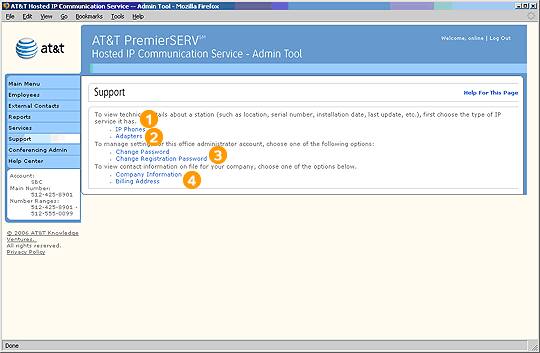
Select any of these links to go to the corresponding Admin Tool screen.
Highlights

IP phones typically connect directly to the Local Area Network (LAN) in your office using an Ethernet jack. This link takes you to a page where you can view the technical specifications of your company's IP phones.

Adapters are devices that make a connection between traditional phones (non-IP phones) and the Local Area Network (LAN) in your office to gain access to HIPCS. This link takes you to a page where you can view the technical specifications of your company's adapters.

These pages let you manage your own Office Administrator password and registration information.

These pages let you change information about your company that is on file with AT&T. For example, if your company changes office locations, you would want to change your address and billing information.
Related Pages
Previous
|
Next