Order Pay Per View on U-verse TV
Watch or record sporting events, concerts, shows, documentaries, movies, and more with Pay Per View.
Get Pay Per View programs
You can enjoy a wide variety of entertainment with our latest and greatest Pay Per View options.
Checking the Pay Per View Events Schedule and finding program times, prices, and order details is easy. Using your U-verse TV remote:
Heads up: You can order Pay Per View events up to 2 weeks in advance. Once you order, you can't cancel.
Checking the Pay Per View Events Schedule and finding program times, prices, and order details is easy. Using your U-verse TV remote:
- Tune to Ch. 101 / 1101 HD.
- Press the arrow keys on your remote to scroll through the calendar of upcoming events.
- When you find a program you want to watch, press OK. A program info screen displays.
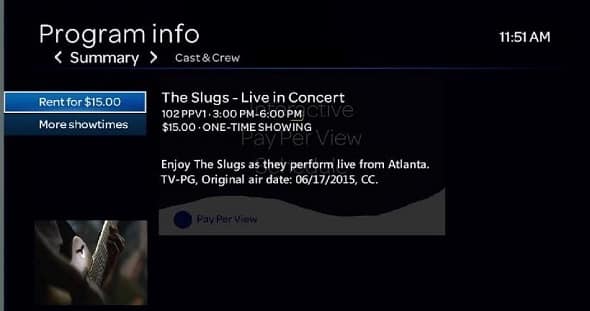
- Follow the onscreen prompts, then select Rent to make your purchase.
- Go to the event’s channel at the scheduled start time. Keep in mind you won’t be able to rewind if you tune in late.
Heads up: You can order Pay Per View events up to 2 weeks in advance. Once you order, you can't cancel.
Last updated: December 7, 2022