
In this tutorial, you will learn how to:
• Access blocked numbers
• Block and unblock numbers
• Block unknown callers
• Block and unblock numbers
• Block unknown callers
Access blocked numbers
1. From the home screen, select the  Phone app.
2. Select the Menu icon, then select Settings. Select Blocked numbers.
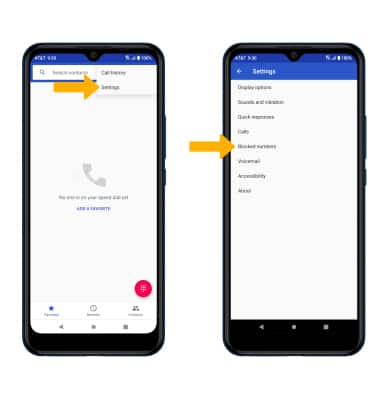
Phone app.2. Select the
Menu icon, then select Settings. Select Blocked numbers. Block and unblock numbers
BLOCK NUMBERS: From the Blocked numbers screen, select Add a number. Enter the desired number, then select Block.
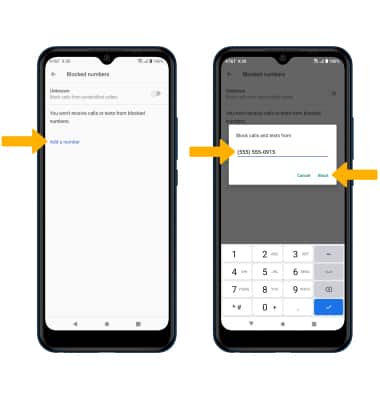
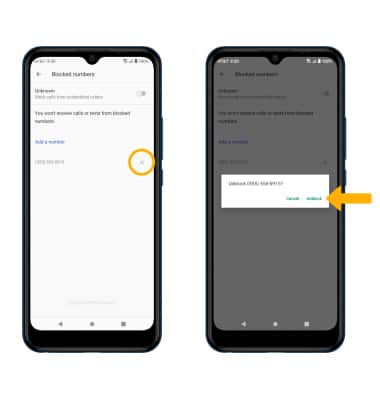
UNBLOCK PHONE NUMBER: Select the X icon next to the desired phone number. Select Unblock to confirm.
Block unknown callers
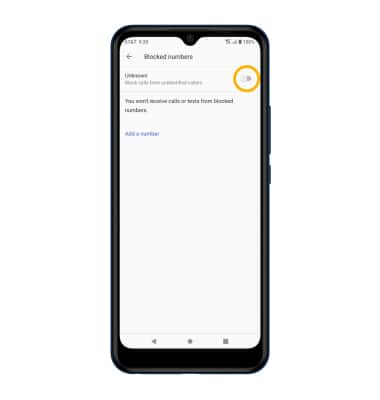
From the Blocked numbers screen, select the Unknown switch.
Call Protect
To automatically block calls from likely fraudsters, get alerts on suspected spam, and manually block calls learn more about AT&T Call Protect. Free for eligible users.