
Overview | Orientation | Tasks

 Previous
|
Next
Previous
|
Next 
Quick Link
The Quick Link page is a pop-up window that collects many frequently used HIPCS functions on one page.
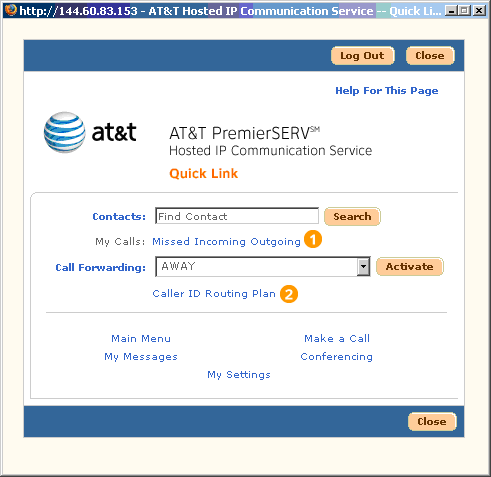
 Quick Link is a persistent pop-up window, which means that it will not close when you link to other pages and will remain active even when the HIPCS browser window is closed. It can be kept on your desktop to give you one-touch access to many of the functions you use all the time. Simply select a function to link directly to it.
Select a "My Calls" link to view your call logs.
When changing your Call Forwarding setting, be sure to select Activate before you leave this page.
If your company has subscribed to AT&T's audio and/or video conferencing features, you can access by selecting "Conferencing."
Select "My Messages" to go to your Unified Messaging screen where you can view all of your voice, email, and fax messages. A light bulb icon appears next to the link when you have a new message.
Highlights

There are three types of Call Logs you can access:
- Missed Calls are incoming calls to your work number that you did not answer. Usually, missed calls are received by your voicemail if you have it turned on.
- Incoming Calls are calls to your work number that you answered.
- Outgoing Calls are calls that you have made from your IP phone or through HIPCS. If you use Remote Calling to initiate the call, the Call Log will record two calls (connection to off-network phone and the number you're calling).

Caller ID Routing Plans are rules you specify to direct incoming calls differently depending on where you are and who is calling. Essentially, a Caller ID Routing Plan is a situation-specific form of Call Forwarding.
Related Pages
Previous
|
Next