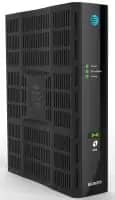
Restarting your All-Fi Hub® or Wi-Fi gateway may help fix common issues with your internet. You can do it on your own or with the Smart Home Manager app.
Important: When you restart your hub or gateway, it will disconnect all devices from the internet or Wi-Fi®. It may take up to five minutes for it to come back online and your devices to reconnect.
Manual restart
- Unplug the power cord from the back of your hub or gateway and the wall. (If you have an internal battery backup, remove it.)
- Wait 20 seconds. Put the internal battery back in, if you have one.
- Plug the power cord back in and wait for it to restart.
Smart Home Manager restart
Don’t have the AT&T Smart Home Manager app yet? Download it from the Apple App Store or Google Play store.
- Open the Smart Home Manager app.
- Select Network (Wi-Fi icon).
- Scroll to and select Restart Wi-Fi.
- Select Restart again.
FYI: These gateways and hubs are compatible with Smart Home Manager:
- BGW720, BGW620, BGW320, BGW210
- BGW830, BGW530, CGW450
- NVG599, NVG589
- Pace 5268AC, Pace 5168, Pace 5031NV
- 2Wire 3600HGV, 2Wire 3801HGV, 2Wire 3800HGV-B