How do I set up a Private LAN Configuration with an existing network on my Versalink modem?
Learn to set up a Private LAN Configuration with an existing network on your Versalink modem.
Set up a Private LAN Configuration
Note: The Gateway can be configured to operate on an existing network by assigning a new address to the Gateway within the same IP range as the network.
Set up a Private LAN Configuration on an existing network
Set up a Private LAN Configuration on an existing network
- Change the Modem IP Address to reflect the existing network address. This address must be the first available address in the network.
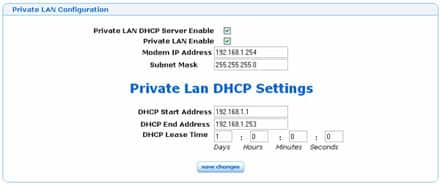
- Type in the DHCP Start and End Address to correlate with the Modem IP Address. The address range must be large enough to accommodate the number of computers in the network and must be greater than the value of the modem IP address.
- Click Save Changes.
Last updated: December 7, 2022
Browse topics
Dedicated Internet & Data Transport
Installation & setup
Order status
Plans & features
Speed, Wi-Fi & troubleshooting
Explore AT&T Dedicated Internet and AT&T Data Transport services.