Find IMEI, Phone & Serial Number
Find IMEI, Phone & Serial Number

Learn how to locate your device's IMEI, serial number, and phone number.
In this tutorial, you will learn how to:
• View phone number
• View serial number
• View IMEI number
View phone number
- Swipe down from the Notification bar with two fingers, then select the
 Settings icon.
 - Scroll to and select About phone.
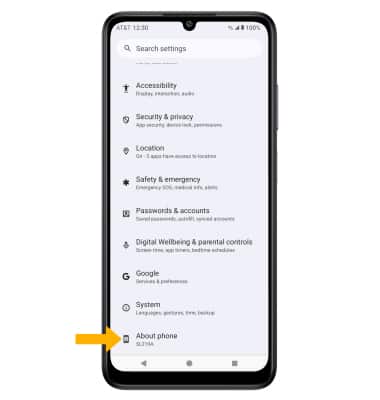
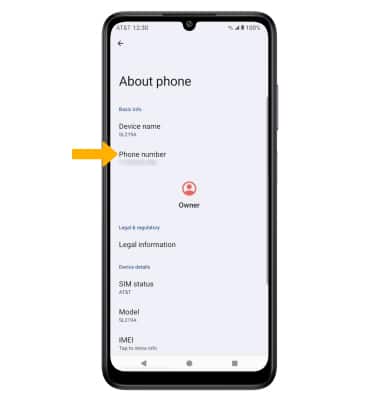
3. The device's Phone number will be displayed.
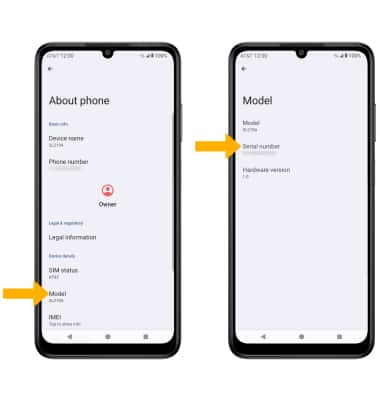
View serial number
From the About phone screen, select Model. The Serial number will be displayed. Note: You can also view your serial number by entering *#06#.
View IMEI number
From the About phone screen, select IMEI. The IMEI number will be displayed.
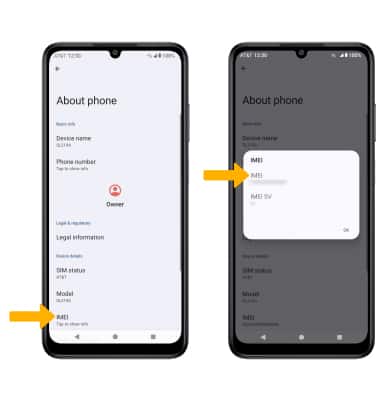
Note: Alternately, type "IMEI" in the Settings search. You can also view your IMEI by entering *#06# from the keypad.