Software Version
Software Version

Stay current by regularly checking for software updates, which often include important security patches and performance enhancements. Before downloading updates, ensure you’re connected to a reliable Wi-Fi or cellular network for a smooth experience.
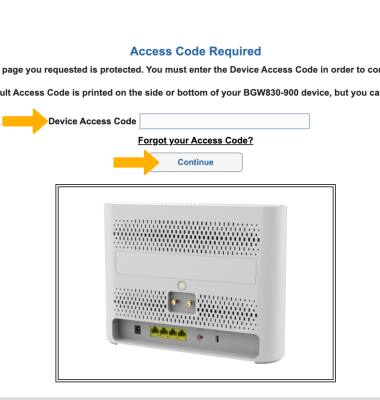
1. From your device’s web browser, go to https://192.168.1.254. Enter your Device Access Code, then click Continue.
Note: Ensure that your device is connected to your AT&T BGW830's Wi-Fi network. For more information, please see the Connect Devices to Wi-Fi or Connect PC or Mac to Wi-Fi tutorials. If this is your first time logging into the Web Web UI, use the default access code printed on the label on the back of the device.
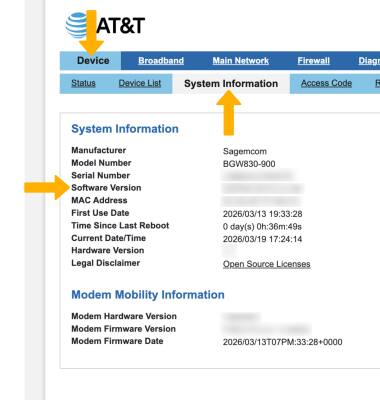
2. Click the Device tab, then click System Information. The current Software Version will be displayed.
Note: The software on the AT&T BGW830 is automatically updated. To manually update device software, click the Diagnostics tab > Update > follow the prompts to update.