Wi-Fi
Wi-Fi

In this tutorial, you will learn how to:
• Quickly turn Wi-Fi on or off
• Turn Wi-Fi on or off
• Connect to a Wi-Fi network
• Forget a Wi-Fi network
When connected to a Wi-Fi network, the

Wi-Fi connected icon will be displayed in the notification bar.
Note: Data transmitted over a Wi-Fi network does not count toward your AT&T data plan and will not be billed. When using the AT&T network, data rates apply.
Quickly turn Wi-Fi on or off
Swipe down from the upper right corner of the screen to access Quick Settings, then select the Wi-Fi icon.
Turn Wi-Fi on or off
- From the Watch screen, swipe left four times then select the
 Settings app.
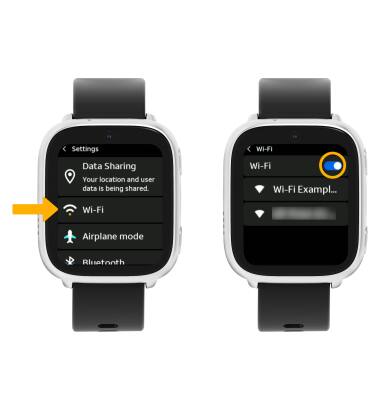
 - Select Wi-Fi, then select the Wi-Fi switch.
Connect to a Wi-Fi network
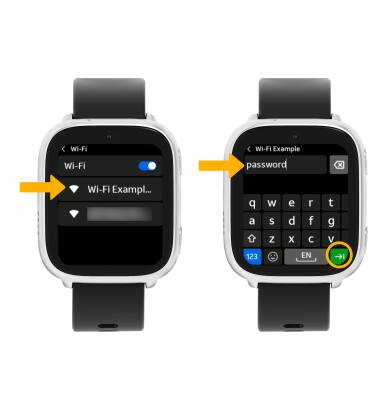
From the Wi-Fi screen, select the desired network name. If connecting to a secure network, enter the Password then select the Arrow icon.
Forget a Wi-Fi network
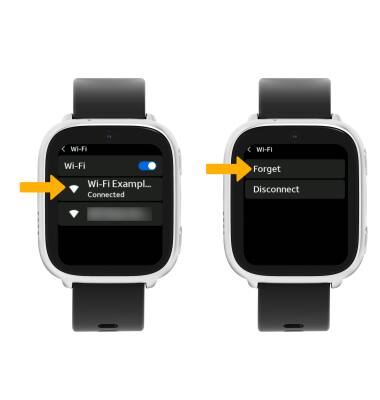
Select the desired network name, then select Forget.
Tips
OPTIMIZE BATTERY LIFE: Turn Wi-Fi off when not in use. View Optimize Battery Life for more information.