Activate New AT&T Prepaid® Service
Activate New AT&T Prepaid® Service

In this tutorial, you'll learn how to activate new AT&T Prepaid® service and plan if you:
- Have a phone and need to buy an AT&T Prepaid SIM and plan online
- Already bought your AT&T Prepaid plan online and need to finish activating
- Purchased a phone or SIM kit from a non-AT&T retailer and need to activate a plan (either from your device, online, or over the phone)
Have a phone and need to buy an AT&T Prepaid® SIM and plan online?
- If you need a physical SIM card:
- Go here to purchase a Prepaid plan.
- Continue to checkout.
- Insert the SIM card we shipped to you into your unlocked device.
- Turn on your device.
- It may take a few minutes for your initial plan payment to process. You should receive a confirmation text.
- You'll be ready to go.
- If you need an eSIM:
- Go here and select Get an eSIM activation card instead.
- Purchase a Prepaid plan.
- Continue to checkout.
- Scan the QR code from the eSIM activation card we shipped to you and follow the prompts.
- Having issues activating your eSIM? Click here and scroll down to the instructions for your device.
- Restart (power cycle) your device.
- It may take a few minutes for your initial plan payment to process. You should receive a confirmation text.
- You’ll be ready to go.
Already bought your AT&T Prepaid® plan online and need to finish activating?
- Bought a plan with SIM Kit online:
- If your device uses a physical SIM card:
- Insert the SIM card into your phone.
- Turn it on.
- It may take a few minutes for your initial plan payment to process. You should receive a confirmation text.
- You’ll be ready to go.
- If your device uses an eSIM:
- Turn your device on.
- Scan the QR code from the eSIM activation card we shipped to you and follow the prompts.
- Having issues activating your eSIM?Click here and scroll down to the instructions for your device.
- Restart (power cycle) your device.
- It may take a few minutes for your initial plan payment to process. You should receive a confirmation text.
- You’ll be ready to go.
- If your device uses a physical SIM card:
- Bought a plan with a new device online:
- Your phone will ship with a SIM card in it.
- Turn on your device.
- It may take a few minutes for your initial plan payment to process. You should receive a confirmation text.
- You’ll be ready to go.
Purchased a phone or SIM Kit from a non-AT&T retailer and need to activate a plan?
Choose how to activate:
- From your device
- Online
- Over the phone
Activate from your device
Note: If you do not have an AT&T Prepaid SIM card or eSIM Activation card, but already own a compatible phone and you would like to activate AT&T Prepaid service, go here to purchase a SIM Kit and plan.
-
Before activating your AT&T Prepaid service from your device, make sure it has been charged:
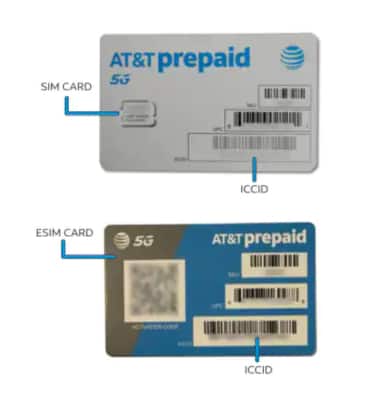
- AT&T Prepaid SIM card: Ensure the physical SIM card is installed and then turn the device on. Proceed to Step 2.
- eSIM: Turn on your device. Scan the QR code from the eSIM activation card and follow the prompts. Proceed to Step 2.
-
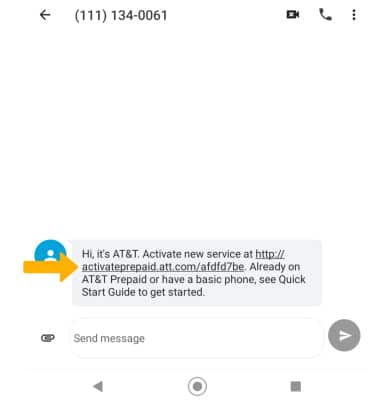
In a few minutes, you will receive a free AT&T text message. Select the unique URL sent in the message.
-
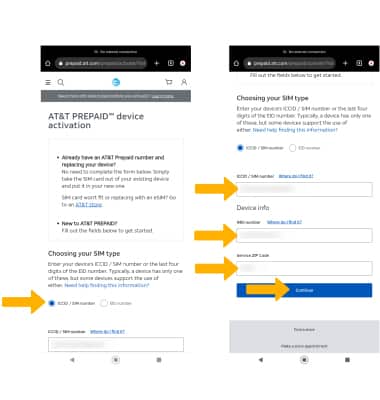
The SIM/ICCID number and IMEI number will auto-populate. Enter your 5-digit service zip code, then select Continue.
-
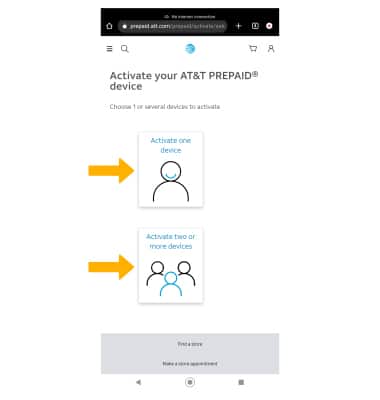
Select whether you would like to Activate one device or Activate two or more devices.Note: "Activate 1 device" was selected for this example. If “Activate 2 or more devices” is selected, you will complete activation of the first device before being prompted to activate additional devices. You’ll need to manually enter the SIM/eSIM ICCID or EID number and IMEI number for each additional device. The SIM/eSIM ICCID is located on the SIM card itself. To locate your IMEI, visit Find your device IMEI number.
-
Select Select this plan under the desired rate plan. Select the check box to accept the Service Agreement, then select Continue.Note: Rate plan options may change.
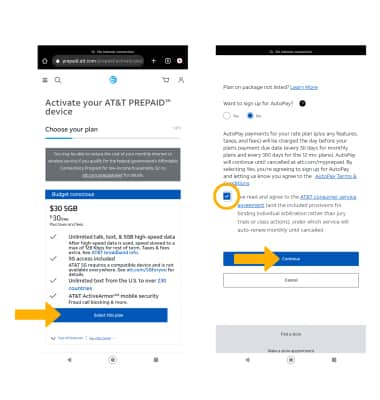
-
Enter and confirm your email address, then select Continue.
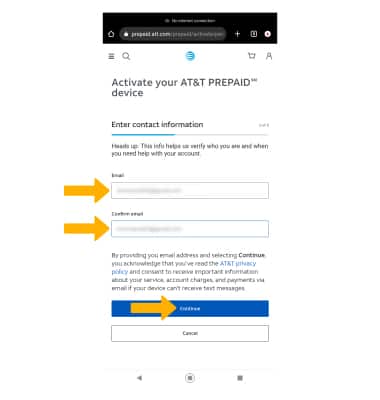
-
Select the Payment Method from the drop-down list.
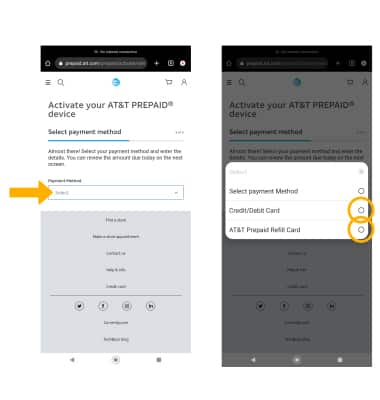
-
Enter the requested payment information, then select Continue.
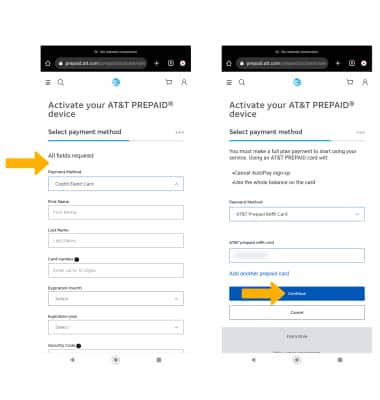
-
View your new phone number, then restart your device.
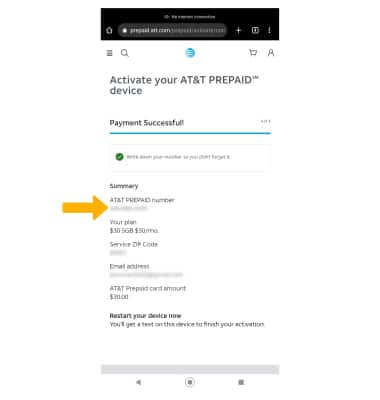
-
A free "Welcome" text message will be sent. Select the link in the text message to set up your account password.
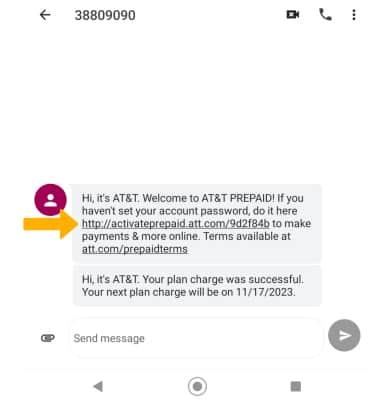
-
Enter and confirm your new password and 4-digit PIN, then select Submit. Select OK.
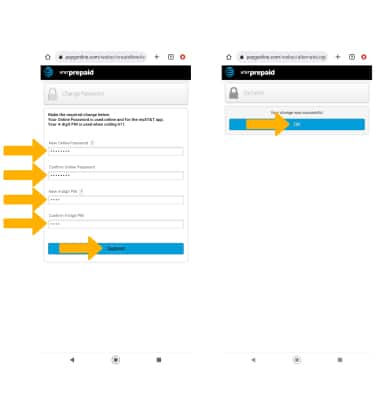
-
Update your personal information, then select Submit.
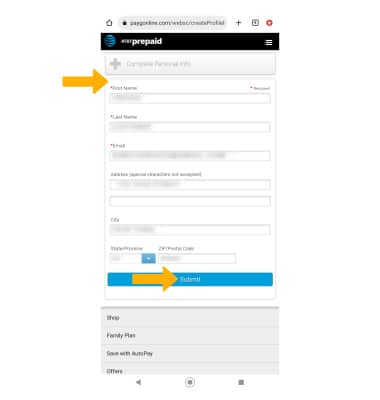
-
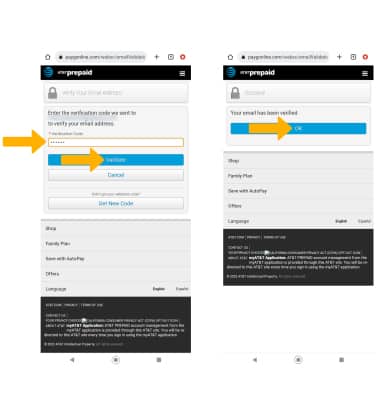
An email with a verification code will be sent to the email address entered previously. Enter the verification code, then select Validate. Select OK.
-
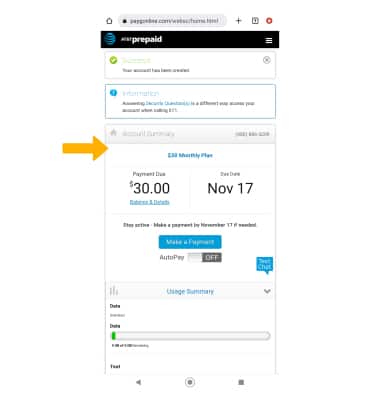
Your AT&T Prepaid account has been successfully created, and you are now logged into your account. Review the Account Summary page for details.
Activate online
From another device connected to the internet, go to att.com/activateprepaid (att.com/activarprepaid for Spanish) and follow the prompts.
Activate over the phone
Call us at 877-426-0525 for automated instructions. You will need to know your SIM/eSIM ICCID & IMEI number for activation. EID is not supported at this time.
Note: Activation will take around 10 minutes to complete. The ICCID is located on the SIM card itself. To locate your IMEI, visit Find your device IMEI number.