LED States
LED States

This graphic includes the LED icons on the device:
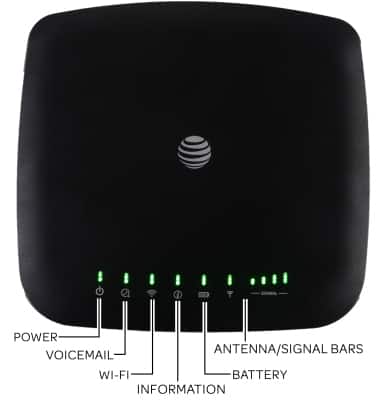
Power
Green Steady: On AC Power
(only lit if powered on; off if connected to power but not powered on)Green Blinking: On Battery Power
(device should work with no battery if it is on AC power)
Off: No Power
Voicemail
Green Blinking: New Voicemail
Off: No new voicemail
Wi-Fi
Green Steady: Wi-Fi on
Green Flickering: Wi-Fi on, data transferring
(flickering according to the realtime bitrate)
Off: Wi-Fi Off
Information
Green Blinking: Check Web UI – New SMS, Data Balance, SIM issue, etc.(Blinking period: 2 seconds – On for 1 second, Off for 1 second)Off: No need to check
Battery
Green Steady: Battery, more than 50%
Yellow Steady: Battery, 20% - 50%
Red Blinking: Battery, less than 20%(Blinking period: 2 seconds – On for 1 second, Off for 1 second)Off: Battery needs to be installed or replaced(Unit will work with AC power without battery installed)
Antenna/Signal Bars
Blue Steady: Strong signal – 3G/4G (HSPA+)(Antenna and 1, 2, 3, 4, 5 bars)Green Steady: Strong signal – LTE(Antenna and 1, 2, 3, 4, 5 bars)Red Blinking: SIM checking, SIM error or other abnormal status(0 bars with RED X. Blinking period: 2 seconds – On for 1 second, Off for 1 second.)Red Steady: No service, Limited Service, Searching 2G/3G/HSPA+/LTE/Femtocell(0 bars with RED X)Blue Blinking: In Femtocell, Strong signal(Antenna and 1, 2, 3, 4, bars. Blinking period: 2 seconds – On for 1 second, Off for 1 second.)