Device Overview
Device Overview

Device layout
The device has 7 LED indicators located on the front of the device.
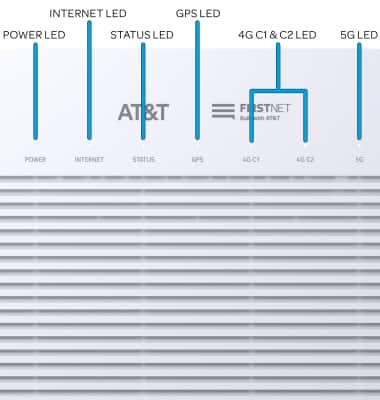
• POWER LED: Indicates device power status.• INTERNET LED: Indicates successfull internet connection. • STATUS LED: Indicates successful connection established with mobile operator network. • GPS LED: Indicates device is ready to provide GPS service. • 4G C1 & C2 LEDs: Indicates device is ready to provide LTE service.• 5G LED: Indicates device is ready to provide 5G service. Note: For more information on any of the LED indicators, visit the LED Indicators tutorial.
Port and button layout
The device has 4 ports and 1 button located on the back of the device .
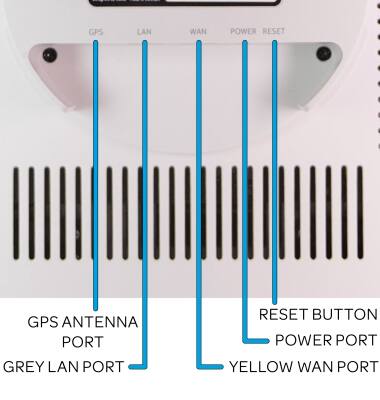
• POWER PORT: Plug in the AC adaptor.• YELLOW WAN PORT: Connect the device to an internet router. • GREY LAN PORT: Connect to other devices, like a PC, if needed. • RESET BUTTON: Reboot or factory reset the device. • GPS ANTENNA PORT: Install the GPS Antenna.
Note: For more information on how to reset your device using the Reset button, visit the Reset device tutorial.
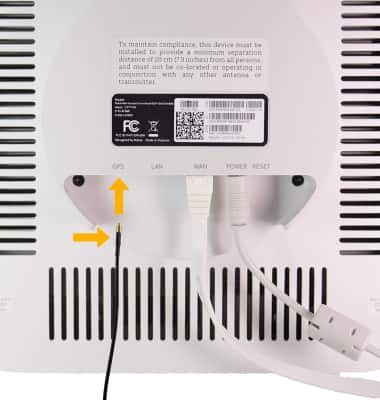
Install the GPS antenna
To install the GPS antenna, insert the gold-side of the GPS cable into the GPS port until it clicks into place.