Block or Unblock Calls
Block or Unblock Calls

When a call is blocked, it is routed directly to voicemail. The call blocking feature may not affect phone calls via third-party apps installed on your device. Contact third party app developers for assistance with such applications.
In this tutorial, you will learn how to:
• Access blocked numbers
• Block and unblock numbers
• Block unknown callers
Access blocked numbers
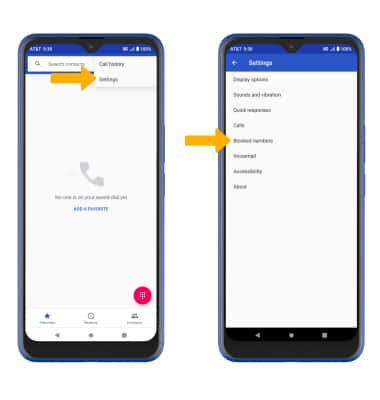
- From the home screen, select the
 Phone app.
 - Select the
 Menu icon, then select Settings. Select Blocked numbers.
Block and unblock numbers
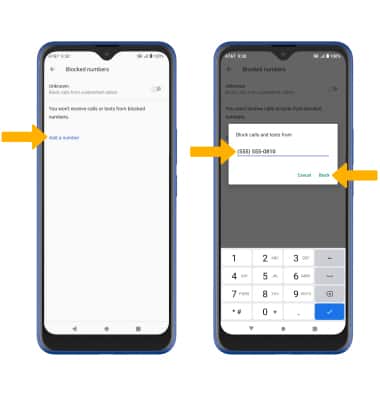
BLOCK NUMBERS: From the Blocked numbers screen, select Add a number. Enter the desired number, then select Block.
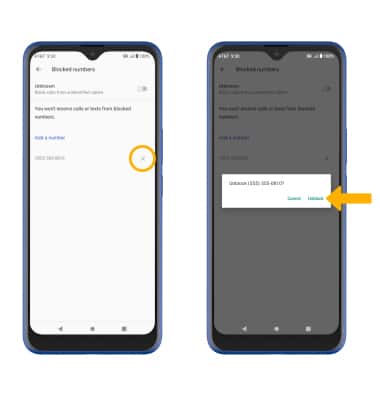
UNBLOCK PHONE NUMBER: Select theX icon next to the desired phone number. Select Unblock to confirm.
Block unknown callers
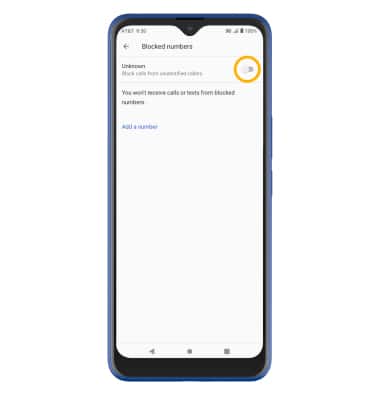
From the Blocked numbers screen, select the Unknown switch.
Call Protect
To automatically block calls from likely fraudsters, get alerts on suspected spam, and manually block calls learn more about AT&T Call Protect. Free for eligible users.