Cambiar el fondo de pantalla
iPad Air 2
Cambiar el fondo de pantalla
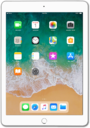
La imagen de fondo de tu dispositivo, también conocida como fondo de pantalla, se puede cambiar en las configuraciones. Puedes usar tu propia imagen como fondo de pantalla o elegir entre las imágenes predeterminadas de tu dispositivo. Puedes cambiar la pantalla de bloqueo y los fondos de la pantalla principal.
1.
Desde la pantalla de inicio, toca Settings.
2.
Toca Wallpaper.
3.
Toca Choose a New Wallpaper.
4.
Toca Stills.
Para este tutorial, estamos seleccionando fondos de pantalla estáticos. Los fondos de pantalla dinámicos se mueven por sí solos y añaden movimiento a tu pantalla de inicio. También puedes seleccionar una de tus propias imágenes desde la aplicación Photos.
5.
Selecciona un fondo de pantalla.
6.
Toca Set.
7.
Toca Set Home Screen.
8.
Oprime el botón Home para ver tu nuevo fondo de pantalla.
9.
¡Completaste los pasos!
