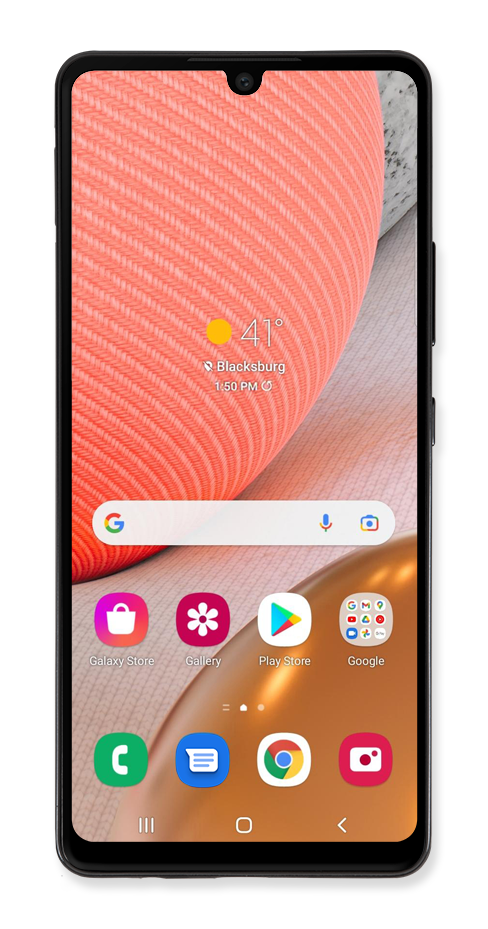
Used to go back one screen.
Se usa para enchufar tu auricular o audífonos.
Listen to audio or phone calls from here.
Used for taking pictures and recording videos.
Takes you to the last Home screen you were on. If you're on a Home screen, it will take you to the main Home screen. Touch and hold for Google Assistant.
Micrófono integrado que se usa para llamadas telefónicas y comandos de voz.
Inserta o retira tu tarjeta nano SIM / microSD aquí.
Abre la aplicación Bixby y enciende el dispositivo.
Shows the apps you've recently opened, letting you switch between and close apps that are running. Touch and hold to enter split screen mode.
Conecta tu teléfono al cargador de batería o a otro dispositivo para transferir datos.
Ajusta el volumen de tu dispositivo.
Used for unlocking the device with your fingerprint.
Se usa para reproducir sonidos en tu dispositivo.
Opens the Camera app.
Opens the browser for exploring the internet.
Opens the app for sending and receiving text messages.
Opens the keypad and phone functions.
We use cookies to help enhance your experience on our site and for analytics. We also may use cookies for marketing purposes. You can manage your preferences and opt out of the sharing for targeted advertising and sales of cookie data.
Learn more about our approach to privacy at att.com/privacy.