Notifications & Alerts
Notifications & Alerts

Learn how to access and adjust notification settings, turn notifications on or off, and more.
In this tutorial, you will learn how to:
• Access notification settings
• Turn lock screen notifications on or off
• Turn notifications on or off on a per-app basis
• Adjust notification sounds
Access notification settings
- Swipe down from the Notification bar with two fingers, then select the
 Settings icon.
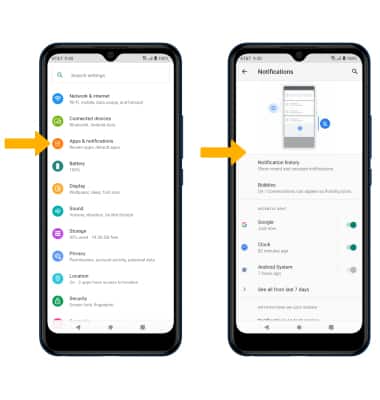
 - Select Apps & notifications > Notifications > edit settings as desired.
Turn lock screen notifications on or off
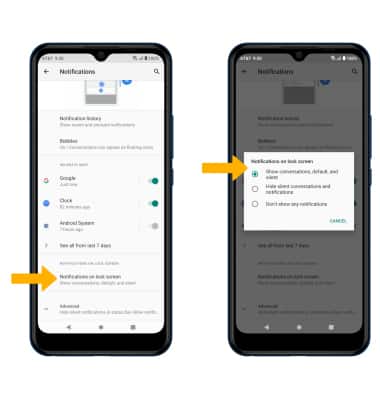
From the Notifications screen, scroll to and select Notifications on lock screenthen select the desired option.
Turn notifications on or off on a per-app basis
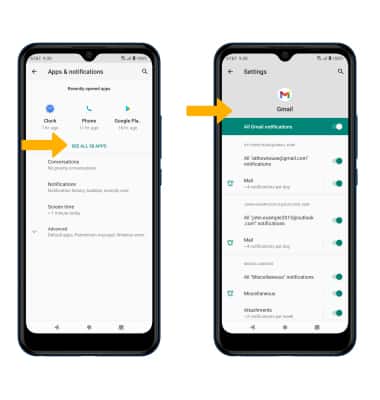
From the Apps & notifications screen, select SEE ALL APPS > desired app > Notifications > adjust notification settings as desired.
Adjust notification sounds
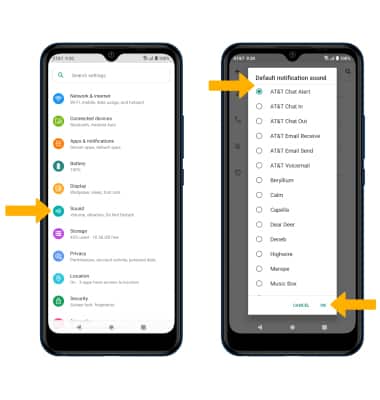
From the Settings screen, select Sound > Advanced > Default notification sound > desired sound > OK.