Wi-Fi Calling
Wi-Fi Calling

Wi-Fi Calling is turned on as part of the activation process. To use Wi-Fi Calling you'll need a Wi-Fi connection and a postpaid AT&T wireless account provisioned with HD Voice. Other restrictions, requirements or limitations may apply. Visit About Wi-Fi calling or att.com/wificalling for more details.
In this tutorial, you will learn how to:
• Check Wi-Fi calling status • Make a Wi-Fi call
When your phone is connected to Wi-Fi, Wi-Fi Calling is on, and a cellular connection is unavailable or poor, you'll see the  Wi-Fi Calling icon in the Notification bar to indicate that calls will be carried over Wi-Fi.
Check Wi-Fi calling status
- From the home screen, select the
 Phone app.
 - Select the
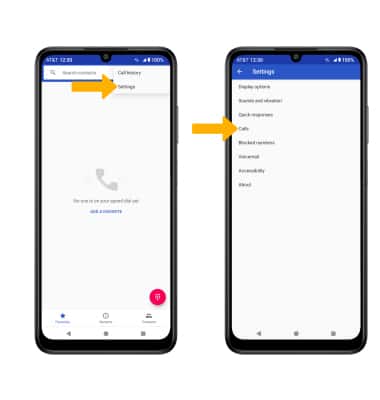
 Menu icon, then select Settings. Select Calls.
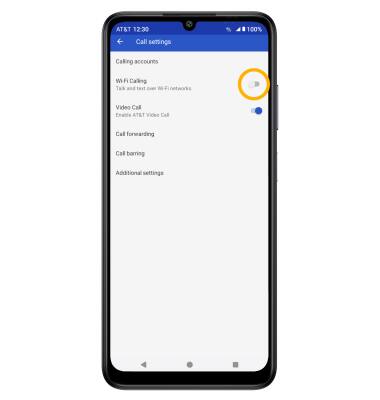
3. Select the Wi-Fi Calling switch to enable.
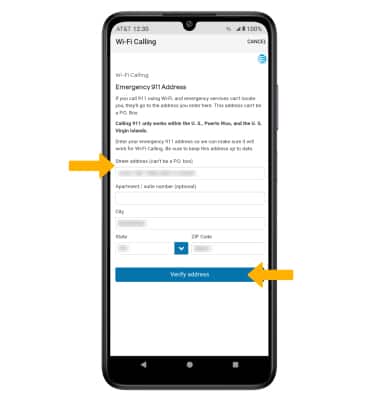
4. Enter your emergency address, then select Verify address.
Note: Select OK to complete set up.
Make A Wi-Fi call
Making a call is the same whether on cellular or Wi-Fi. From the home screen, select the Phone app >  Dial Pad icon > dial the desired number > select the Call icon.