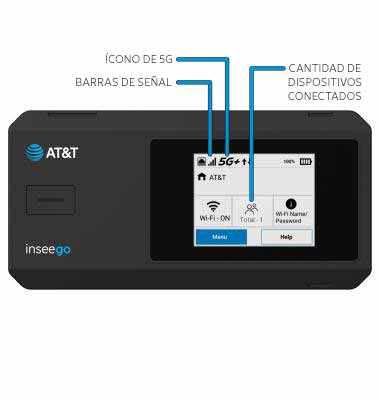
1. El dispositivo mostrará barras de señal y el ícono 5G en la pantalla de inicio del dispositivo cuando se conecte correctamente a Wi-Fi. La cantidad de dispositivos conectados aparecerá en la pantalla principal.
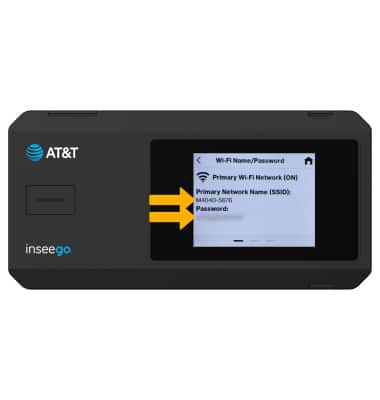
2. En la pantalla principal del dispositivo, seleccione el botón Menu > Wi-Fi > Wi-Fi Nombre/Contraseña. Aparecerá el nombre y la contraseña de la redWi-Fi.
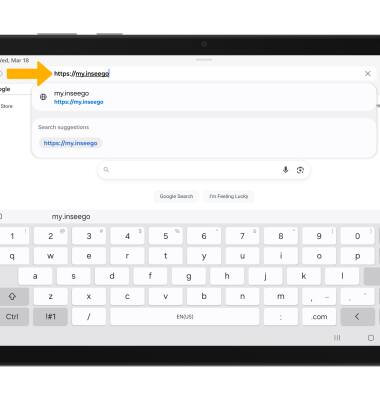
3. Desde el navegador de su dispositivo conectado, vaya a http://my.inseego.
Importante: Asegúrate de que tu dispositivo esté conectado al Inseego MiFi PRO M4Es la red de Wi-Fi. Para obtener más información, visita los tutoriales Connect Devices to Wi-Fi o Connect PC o Mac to Wi-Fi. Si esta es la primera vez que ingresas a la página de administrador web, la contraseña predeterminada aparecerá en la parte inferior de tu dispositivo. Se te indicará que cambies la contraseña de administrador.
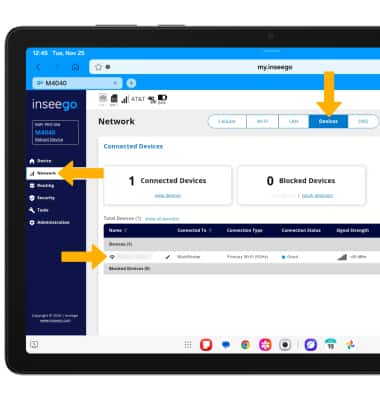
4. Seleccione el menú Network, luego seleccione la pestaña Devices para ver los dispositivos conectados.
Importante: Selecciona el dispositivo conectado que desees para ver información adicional.
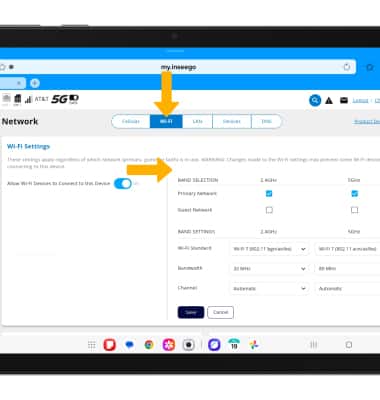
5. Seleccione la pestañaWi-Fi para ver Wi-Fi información de la red.