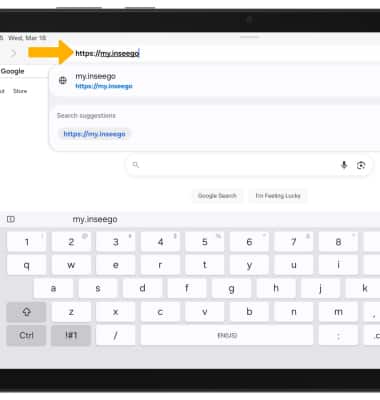
1. Desde el navegador de su dispositivo, vaya a http://my.inseego.
Importante: Asegúrate de que tu dispositivo esté conectado al Inseego MiFi PRO M4Es la red de Wi-Fi. Para obtener más información, visita los tutoriales Connect Devices to Wi-Fi o Connect PC o Mac to Wi-Fi. Si esta es la primera vez que ingresas a la página de administrador web, la contraseña predeterminada aparecerá en la parte inferior de tu dispositivo. Se te indicará que cambies la contraseña de administrador.
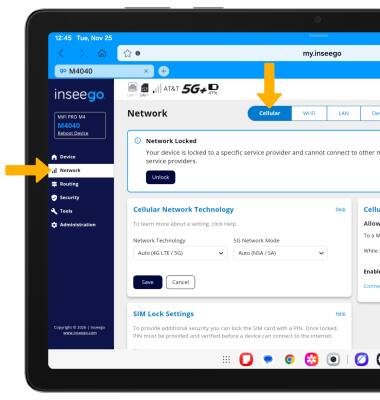
2. Seleccione el menú Network, luego seleccione la pestaña Cellular.
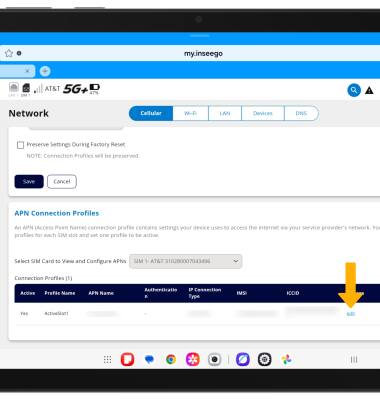
3. Desplázate hasta APN Connection Profiles, luego selecciona editar junto al perfil deseado.
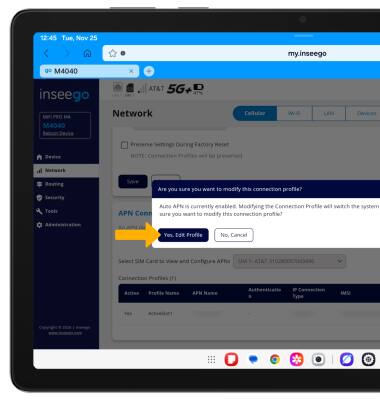
4. Revise la indicación Modificar el perfil de conexión, luego seleccione Sí, Editar perfil.
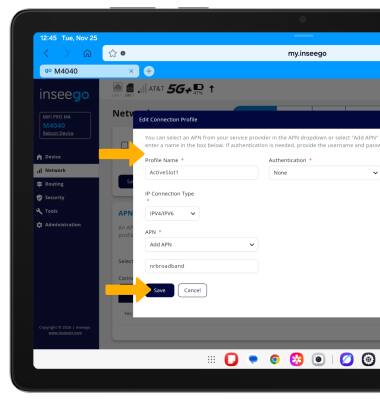
5. Edite las configuraciones deseadas, luego seleccione Guardar.
Importante: Cambiar la información apn puede provocar una falla en la conexión. Comunícate con tu compañía de servicio antes de cambiar el APN y hazlo únicamente cuando sea necesario.