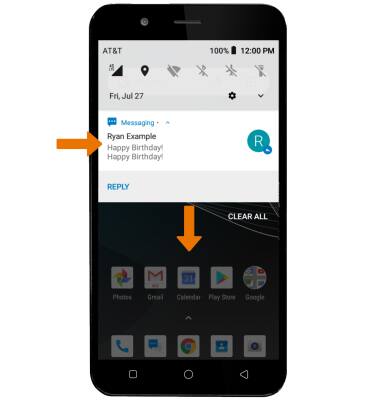
- TENER ACCESO A NOTIFICACIONES: deslízate hacia abajo desde la barra de notificaciones. Se mostrarán las notificaciones.
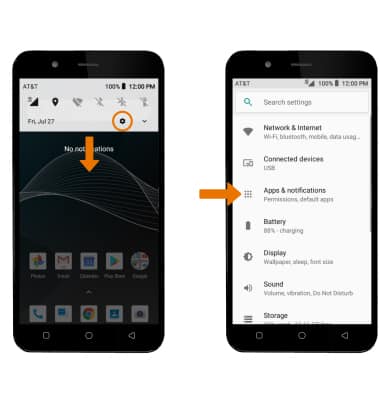
- ACTIVAR/DESACTIVAR TODAS LAS NOTIFICACIONES EN LA PANTALLA DE BLOQUEO: desplázate hacia abajo desde la barra de notificaciones, luego selecciona el ícono Settings. Selecciona Apps & notifications.
- Selecciona Notifications > On the lock screen > la opción que desees.
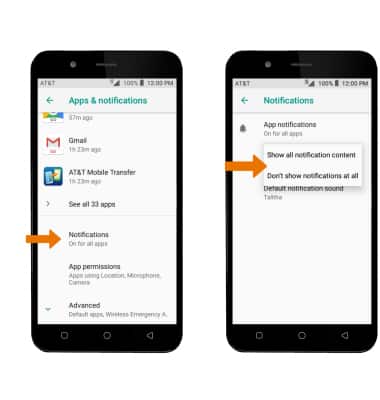
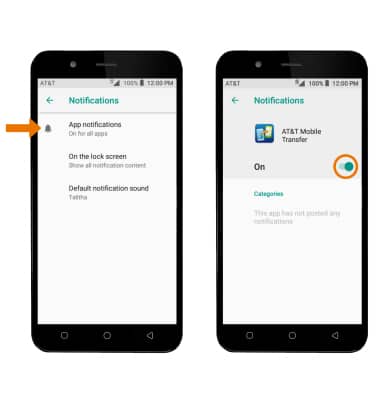
- ACTIVAR/DESACTIVAR NOTIFICACIONES POR APLICACIÓN: en la pantalla Notifications, selecciona App notifications > la aplicación que desees > edita las configuraciones de notificación según prefieras.
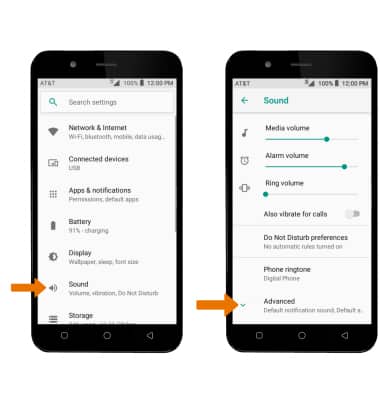
- CAMBIAR EL SONIDO DE LAS NOTIFICACIONES: en la pantalla Settings, selecciona Sound. Selecciona Advanced.
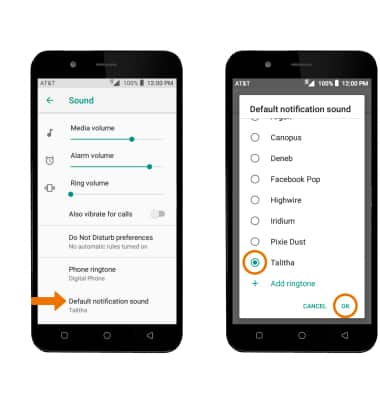
- Selecciona Default notification sound. Elige la opción que desees y luego selecciona OK.
Notificaciones
AT&T AXIA (QS5509A)
Notificaciones
Cómo tener acceso y ajustar la configuración de las notificaciones, activar o desactivar las notificaciones, ajustar las notificaciones de la aplicación, ajustar los sonidos de notificación y activar o desactivar las placas.
INSTRUCTIONS & INFO