Opciones de llamada

Alcatel idealXtra (5059R)
Opciones de llamada
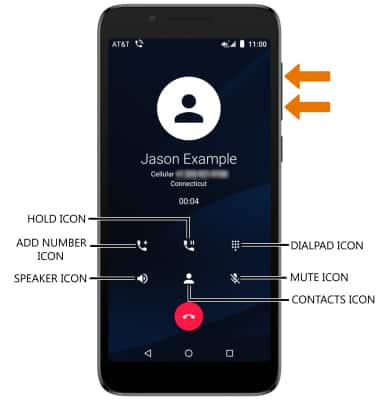
Learn what features are available while on an active call. Use your volume, hold, mute and speaker phone buttons; access your contacts, dialpad and home screen; return to an active call and end a call.
INSTRUCTIONS & INFO
- ACTIVAR OPCIONES DE LLAMADAS: oprime los botones Volume para subir o bajar el volumen de la llamada. Selecciona el ícono que desees para acceder a la funcionalidad que quieras.
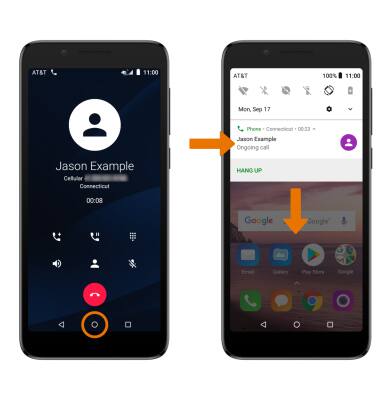
- ACCEDER A LA PANTALLA PRINCIPAL/VOLVER A UNA LLAMADA ACTIVA: mientras estás en una llamada activa, selecciona la tecla Home para acceder a la pantalla principal. Para volver a la llamada activa, desplázate hacia abajo desde la barra de notificaciones y selecciona Active Call notification.