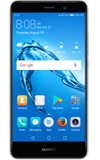
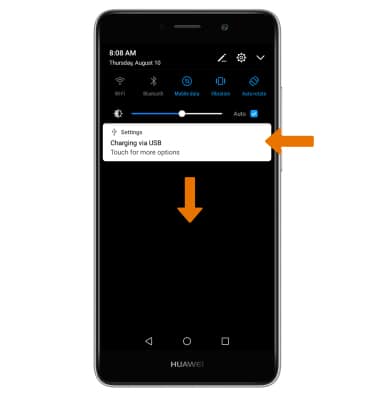
- TENER ACCESO A NOTIFICACIONES: deslízate hacia abajo desde la barra de notificaciones. Aparecerán las notificaciones.
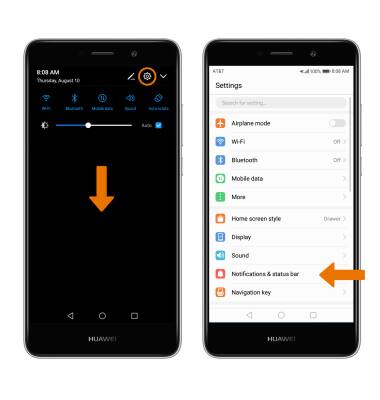
- ACTIVAR/DESACTIVAR TODAS LAS NOTIFICACIONES: deslízate hacia abajo desde la barra de notificaciones y luego selecciona el ícono Settings. Selecciona Notifications & status bar.
- Selecciona Notification management > ícono Settings > When device is locked > la opción que desees > selecciona OK.
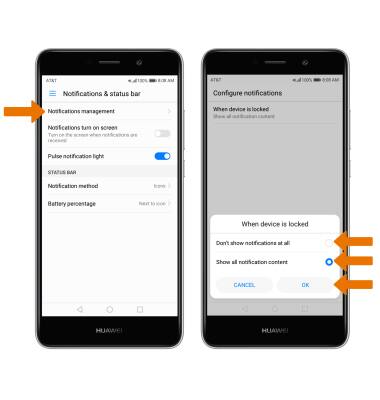
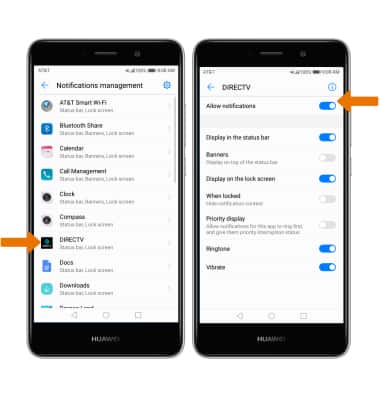
- ACTIVAR/DESACTIVAR NOTIFICACIONES POR APLICACIÓN: en la pantalla Notifications management, selecciona la aplicación que desees. Edita las configuraciones de las notificaciones según lo desees.
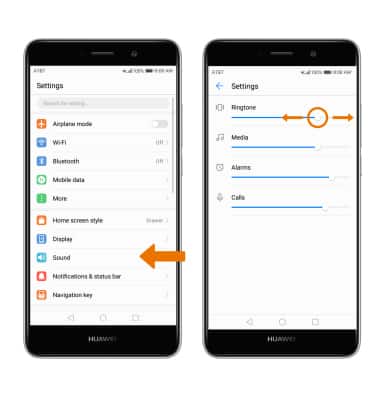
- AJUSTAR SONIDOS DE LAS NOTIFICACIONES: en el menú Settings, selecciona Sound. Selecciona Volume y luego ajusta la barra deslizadora de volumen según lo desees.
- CAMBIAR EL TONO DE TIMBRE DE NOTIFICACIÓN: en la pantalla Sound, selecciona Default notification sound. Selecciona el tono de timbre que desees y luego el ícono Checkmark.
Importante: Para bloquear o desbloquear notificaciones que aparecen cuando el dispositivo está bloqueado, deslízate hacia abajo desde la barra de notificaciones > selecciona el ícono Settings > Notifications & status bar > Notification Management > ícono Settings > When device is locked > la opción que desees > selecciona OK.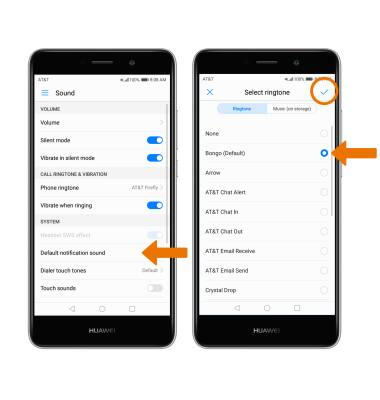
Notificaciones
Huawei Ascend XT2 (H1711)
Notificaciones
Aprende a tener acceso y ajustar las configuraciones de notificaciones y activar y desactivar las notificaciones.
INSTRUCTIONS & INFO