
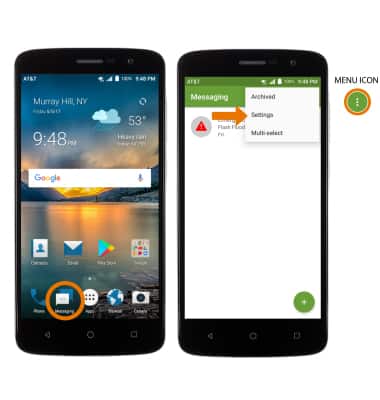
- ACCEDER A LA CONFIGURACIÓN DE MENSAJES: en la pantalla principal, selecciona la aplicación Messaging. Selecciona el ícono Menu, luego selecciona Settings.
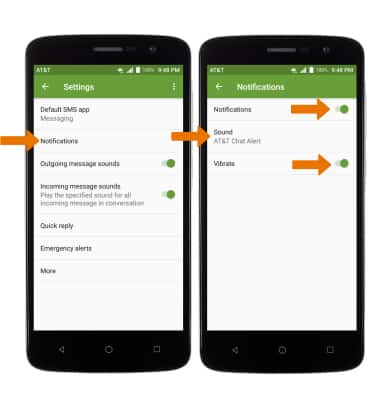
- AJUSTAR LAS ALERTAS Y SONIDOS DE LAS NOTIFICACIONES: selecciona Notifications, luego selecciona el botón Notifications para activar o desactivar las notificaciones. AJUSTAR EL TONO DE TIMBRE: selecciona Sound y luego el tono de timbre que desees. HABILITAR/DESHABILITAR VIBRACIÓN: selecciona el selector Vibrate.
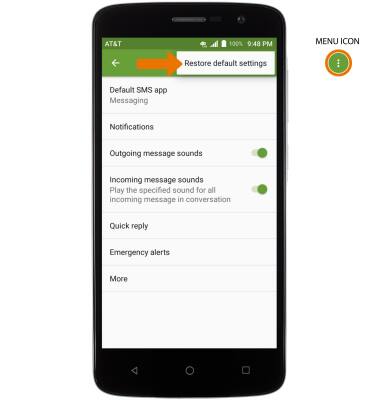
- RESTABLECER LAS CONFIGURACIONES PREDETERMINADAS: en Messaging Settings, selecciona el ícono Menu > Restore default settings.
ALERTAS DE EMERGENCIA: en la configuración de Messaging selecciona Emergency alerts y edita lo que quieras.
Importante: Obtén detalles sobre Alertas de emergencia por servicio móvil (WEA).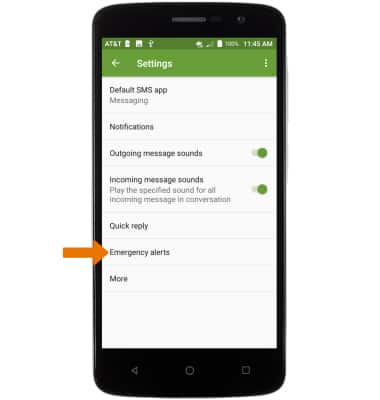
Configuración de mensajería
ZTE Blade Spark (Z971)
Configuración de mensajería
Administra las configuraciones del servicio de mensajes, como alertas de notificación, límites de mensajes, configuraciones de avisos de emergencia/AMBER.
INSTRUCTIONS & INFO