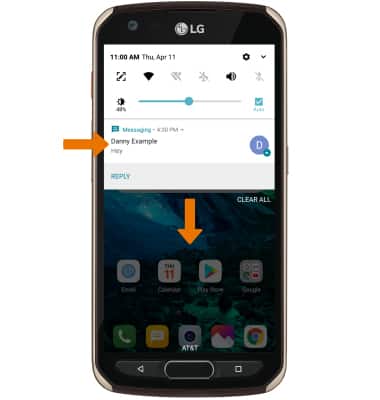
1. OBTÉN ACCESO A LAS NOTIFICACIONES: deslízate hacia abajo desde la barra de notificaciones. Se mostrarán las notificaciones.
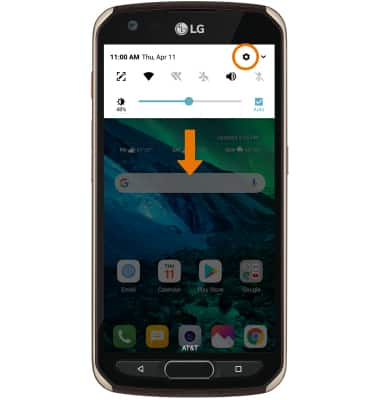
2.ACTIVAR/DESACTIVAR NOTIFICACIONES: deslízate hacia abajo desde la barra de notificaciones, luego selecciona el ícono Settings.
3. Selecciona la pestaña General > Apps & notifications > Notifications > Lock screen > opción que desees.
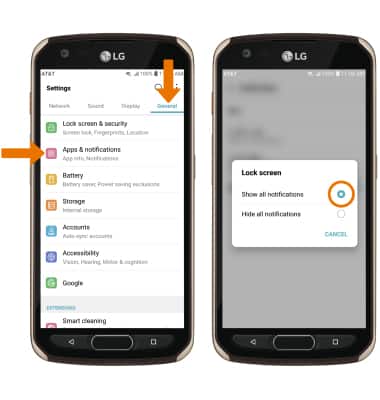
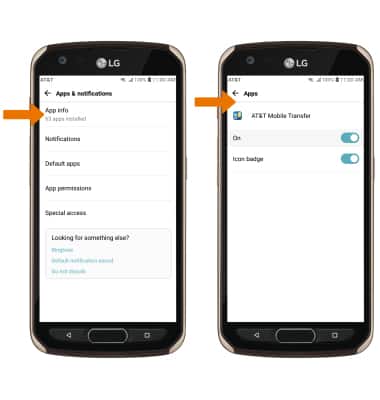
4. ACCEDER A LA CONFIGURACIÓN DE NOTIFICACIONES POR APLICACIÓN: en la pantalla Apps & notifications, selecciona App info > aplicación que desees > App notifications > edita las Notification settings como quieras.
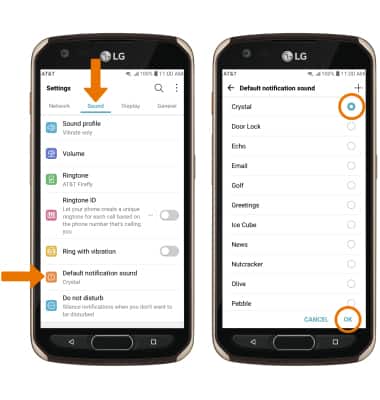
5. AJUSTAR SONIDOS DE NOTIFICACIONES: en la pantalla Settings, selecciona la pestaña Sound > Default notification sound > sonido que desees > OK.