
En este tutorial, aprenderás a hacer lo siguiente:
• Activa/desactiva el hotspot móvil
• Mira el nombre de la red del hotspot móvil y dispositivos conectados
• Ajusta las configuraciones del hotspot
Cuando el hotspot móvil esté activado, el  ícono Mobile hotspot aparecerá en la barra de notificaciones.
Activa/desactiva el hotspot móvil
1. Desde la pantalla principal, presione la tecla dinámica central para acceder al menú. Oprime las teclas de navegación para seleccionar el  Aplicación Settings y luego oprime el botón Select.
2. Press the navigation keys and then the Select button to select Network & internet > Hotspot & tethering > Wi-Fi hotspot.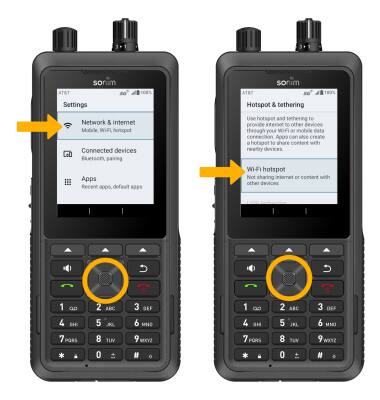
3. Press the Select button to turn the Use Wi-Fi hotspot switch on or off.
Importante: Si Wi-Fi está activado, se te indicará que selecciones la tecla dinámica derecha para seleccionar OK. 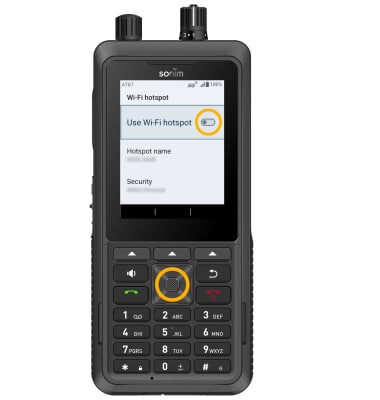
Mira el nombre de la red del hotspot móvil y dispositivos conectados
VIEW MOBILE HOTSPOT NETWORK NAME: The Hotspot name is displayed on the Wi-Fi hotspot screen.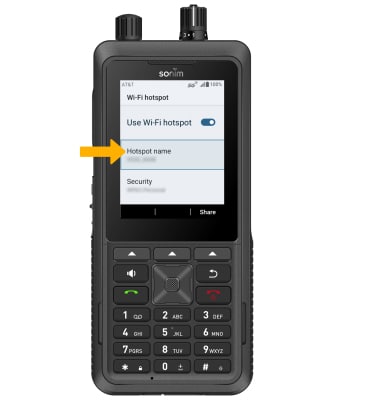
VER DISPOSITIVOS CONECTADOS: oprime las teclas de navegación para resaltar Connected Device List, luego oprime el botón Select. Se mostrarán los dispositivos conectados.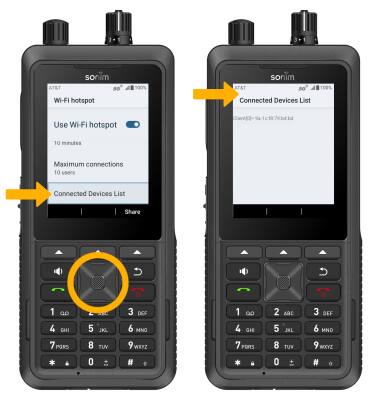
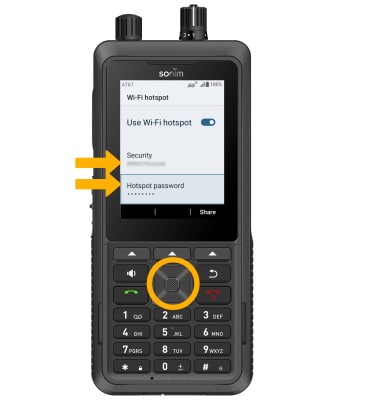
Ajusta las configuraciones del hotspot