
En este tutorial, aprenderás a hacer lo siguiente:
• Acceder al correo de voz
• Escucha un correo de voz
• Share or save a voicemail
Acceder al correo de voz
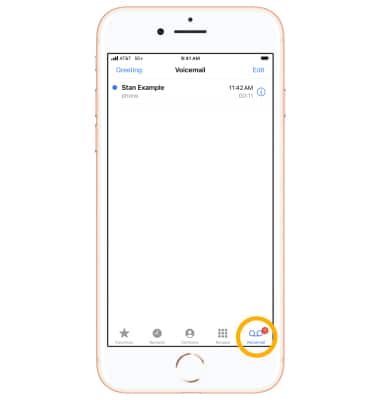
1. Desde la pantalla principal, selecciona la  app Phone.
2. Select the Voicemail tab.
Note: Alternatively, from the phone app, select the Keypad tab > select and hold the 1 key > if prompted, enter your voicemail password > follow the prompts to listen to your messages.
Escucha un correo de voz
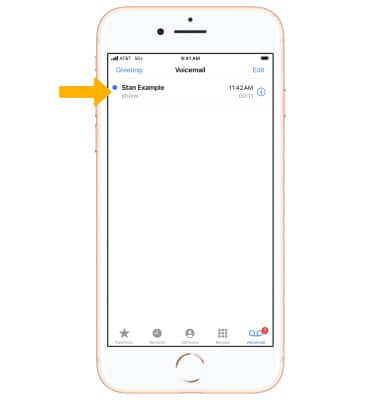
1. Selecciona el mensaje que desees.
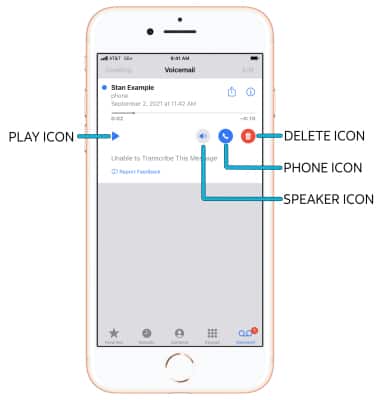
2. Select the corresponding icon:
2. Select the corresponding icon:
• PLAY/PAUSE: Select the Play icon to play the message. Select the Pause icon to pause the message.
• SPEAKER: Select the Speaker icon to enable or disable speaker mode.
• CALL BACK: Select the Phone icon to call back the phone number.
• DELETE: Select the Delete icon to delete the voicemail.
Note: A transcription of the voicemail message will appear at the bottom of the voicemail options.
Note: A transcription of the voicemail message will appear at the bottom of the voicemail options.
Share or save a voicemail
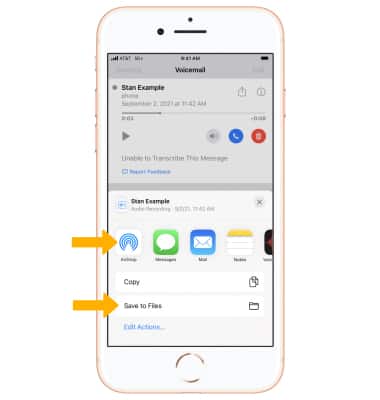
1. From the desired voicemail, select the  ícono Share.
Note: Learn more about sharing with an AirDrop contact.
2. Select the desired share or save method and follow the prompts.
Note: Go to Troubleshoot Voicemail for solutions to common voicemail problems.