myAT&T for Business wireless customers
Learn about the new online look and feel with myAT&T for business customers.
You are now registered on myAT&T where you can view, pay and manage your small business accounts.
Learn how to add another account to your Access ID and use one sign in for multiple accounts. You can link your Wireless, Traditional phone, Internet, Digital phone, U-verse internet, and even your Personal accounts.
Learn more about linking accounts
The Accounts and Services page will mirror the plans and services on your account in a card based format.
Learn how to add another account to your Access ID and use one sign in for multiple accounts. You can link your Wireless, Traditional phone, Internet, Digital phone, U-verse internet, and even your Personal accounts.
Learn more about linking accounts
The Accounts and Services page will mirror the plans and services on your account in a card based format.
Understanding the Cards on the Account & Services page
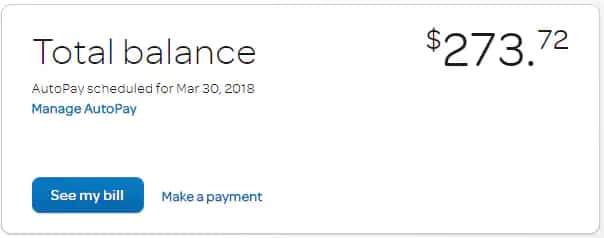
- The TOTAL BALANCE card will display the balance due on your account. From this card, you can now:
- Manage Auto pay
- Make a Payment towards your account balance
- View your Bill

- The WIRELESS card will display your business account number and usage data. If you have multiple business wireless accounts, you will see a card for each account. Hit the (+) button on your wireless card and you will be able to:
- Manage usage on your plan
- Manage your plan
- View your devices and features
- See your upgrade options
- Get more help and support
Once you link multiple business services to one Access ID, you will see cards for each service on your account. In addition to products and services we will display any pending orders and scheduled appointments on your account.
We have more good news for you!

You can also use the myAT&T app to manage your business wireless account. Use the myAT&T app to perform a variety of tasks, such as:
- View your bill
- Make a payment
- Check order status
- Review your plan and features
To download
- Go to att.com/myattapp on your smartphone or tablet, or
- Text the word myATT to 556699 from any device and get a link to download the app.
Last updated: April 15, 2024
Browse topics
Activation & setup
International
Plans & features
Learn how to activate a device, unlock a SIM or device, use Wi-Fi, or explore coverage.