Deals
iPhone deals
Samsung Galaxy deals
Holiday deals
Business employee
55+
Military
Active first responders
Retired responders
Nurses & physicians
Teachers
Union
Credit card
&More Benefits
Explore wireless
Phone plans
New phones & devices
Upgrade
Bring your own phone
Add a Line
Switch and save
Trade in your device
International phone plans
Shop new iPhones
Shop Certified Pre-Owned
iPhone 17
Samsung Galaxy S25
Why AT&T Wireless
Wireless help
More resources
Explore home internet
Internet plans
Fiber internet
Home Wi-Fi
Check availability
AT&T Internet Air
Moving services
Bundles
Gaming
Home business
Internet help
Speed test
More resources
Access from AT&T
Explore AT&T PREPAID
Prepaid plans
Prepaid phones
Bring your own phone
Prepaid deals
Prepaid account
Activate your service
Lease-to-Own
Home Phone Services
AT&T Phone
AT&T Phone – Advanced
Landline Phone
Lifeline
Phones & accessories
Digital phone help
Landline phone help
Bundles
Internet + Wireless
Internet + Phone
Home office
Smart watches & devices
Smart home
In-car Wi-Fi
All accessories
Headphones
Phone & tablet cases
Chargers
Screen protectors
Speakers & smart home
Internet & TV equipment
PopSockets & more
Gadgets & gaming
Accessory deals

Update your DSL network password – Netgear 7550

Your Digital Subscriber Line (DSL) network password is system generated and is used by the modem or router to authenticate and connect to the DSL network.


Network password update

Note: The network password is stored in your modem or router and should not be modified unless you are instructed to do so by an AT&T technician.
  1. Go to your gateway settings.
  2. Select Advanced.
  3. Enter your Device Access Code found on the side or bottom of your modem.
  4. Select Continue.
  5. Select Connection Configuration.
  6. Verify your User ID is correct. If it isn’t, enter the correct User ID.
  7. Enter your DSL Network Password in the Password field.
  8. Enter your DSL Network Password in the Retype Password field. Retype Password follows Password field
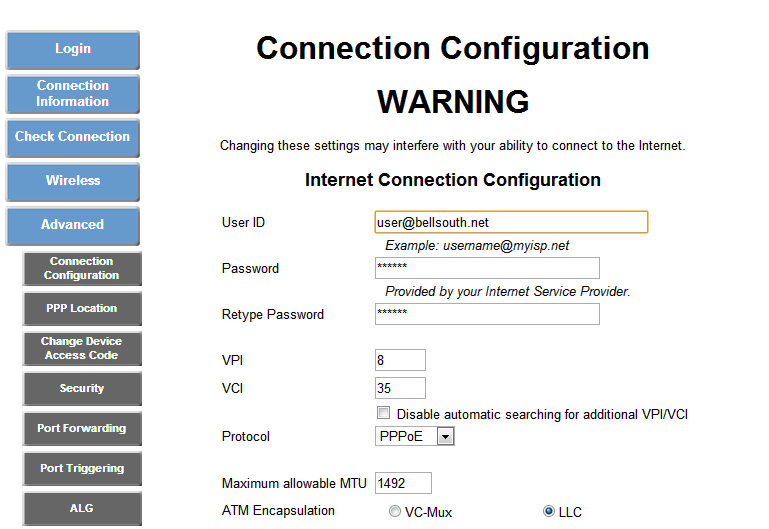
  9. Select Save.
Last updated: December 7, 2022

Browse topics

Did you get the help you needed?


Did you get the help you needed?