Understand your gateway status lights - Westell 327W
Learn what your modem or Wi-Fi gateway status lights mean, and how to use them to troubleshoot problems with your modem or gateway.
You’re viewing instructions for
Internet equipment
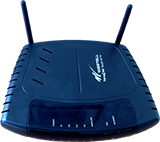
Westell
327W
KM1050477-slctrgrp_west327w
Learn what your gateway status lights mean
Note: Your model number is located on the back, side, or bottom of your gateway or modem.
Use the following chart to interpret your gateway status lights.
Status lights for Westell 327W
| Status Light | State | Description |
| Power | Off | Power is off or gateway is not getting power. |
| Solid Green | Power is on. | |
| Solid Red | Power on/self-test failed or gateway has malfunctioned. If light stays red longer that 2 seconds, the gateway has malfunctioned. Contact Technical Support. | |
| Ethernet (E1, E2, E3, E4) | Off | No cable or device is connected to gateway, or gateway is off. |
| Solid Green | A device is connected by Ethernet to the gateway. | |
| Flashing Green | Data traffic on the network. | |
| Wireless | Off | No devices are connected wirelessly or gateway is off. |
| Solid Green | A device is connected wirelessly. | |
| Flashing Green | Data traffic on the network. | |
| DSL | Off | No DSL signal or gateway is off. |
| Solid Green | Gateway is connected to DSL. | |
| Flashing Green | Gateway is attempting to sync with DSL. | |
| Solid Red | Possible hardware failure. Contact Technical Support. | |
| Internet | Off | Gateway is in bridge mode or is off. |
| Solid Green | Gateway is connected to the Internet. | |
| Flashing Green | Internet is connected and data traffic is passing through the gateway. | |
| Solid Red | Gateway can't connect to the Internet. |
Try these troubleshooting tips to fix W-Fi connection problems
Last updated: March 11, 2025
Browse topics
Connections, browsing & security
Installation & order status
Troubleshooting & repair
Learn about DSL internet and Wi-Fi connections, tools, and security.