In this tutorial, you will learn how to:
• Block numbers
• Unblock numbers
Block numbers
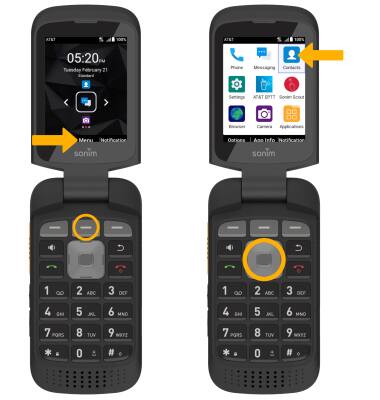
1. From the home screen, press the Center Dynamic key to access the Menu. Press the navigation keys to highlight the Contacts app, and press the Select button.
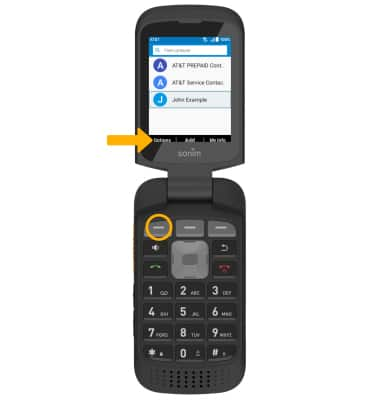
2. Press the Left Dynamic key to select Options.
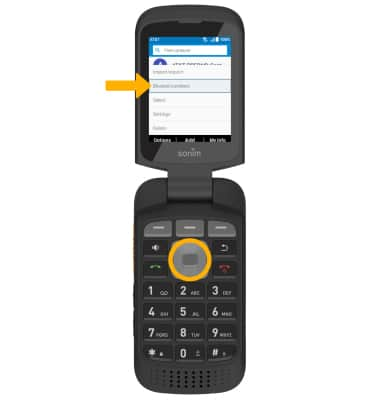
3. Press the navigation keys to highlight Blocked numbers, then press the Select button.
2. Press the Left Dynamic key to select Options.
3. Press the navigation keys to highlight Blocked numbers, then press the Select button.
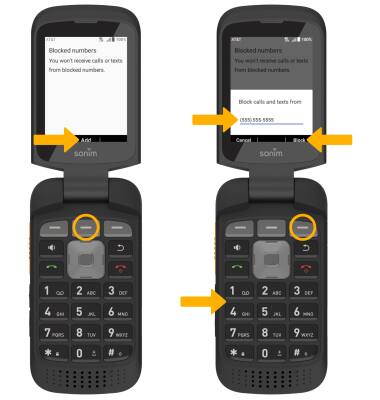
4. Press the Center Dynamic key to select Add, then use the keypad to enter the desired number. Press the Right Dynamic key to select Block.
Unblock numbers
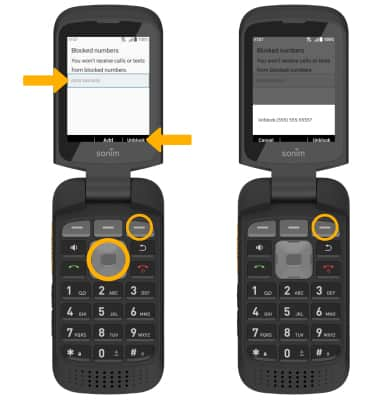
From the blocked numbers screen, press the navigation keys to highlight the desired number, then press the Right Dynamic key to select Unblock. Press the Right Dynamic key again to confirm.