
In this tutorial, you will learn how to:
• Turn Mobile Hotspot on/off
• View Mobile Hotspot network name
• Configure hotspot settings
When Mobile Hotspot is enabled, the  Mobile hotspot icon will be displayed in the Notification bar.
Turn mobile hotspot on/off
1. Swipe down from the Notification bar with two fingers, then select the  Settings icon.
2. Select Network & internet, then select Hotspot & tethering. 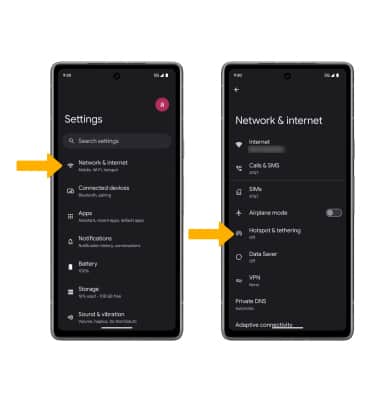
3. Select Wi-Fi hotspot, then select the Use Wi-Fi hotspot switch.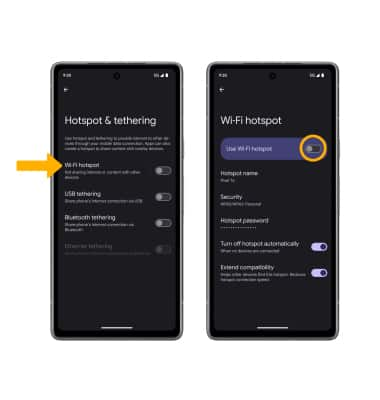
View Mobile Hotspot network name
The Mobile Hotspot Network name, Mobile Hotspot Security type, and Mobile Hotspot password will be displayed on the Mobile hotspot screen.
Configure hotspot settings
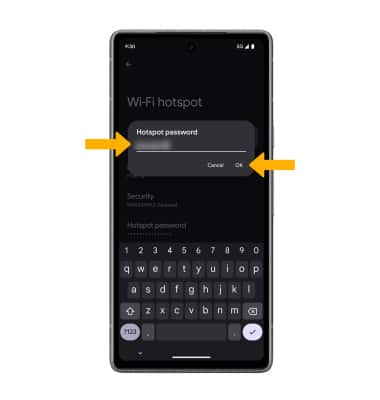
1. From the Wi-Fi hotspot screen, select the desired network setting:
• HOTSPOT NAME: Change the Name of the Mobile Hotspot network.
• SECURITY: Change the Security type of the Mobile Hotspot network.
• PASSWORD: Change the Password of the Mobile Hotspot network.
2. Edit the desired information, then select OK when finished.