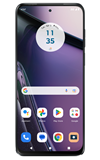
In this tutorial, you will learn how to:
• Block messages
• Unblock messages
• Block unknown numbers
Block messages
1. From the home screen, select the  Messages app.
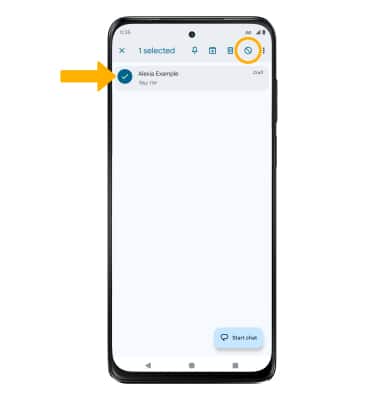
2. Select and hold the desired message thread, then select the Block icon.
Note: To block unknown numbers, from the Messages app, select the  Account icon > Spam & blocked >
  Menu icon > Blocked numbers > Unknown switch.
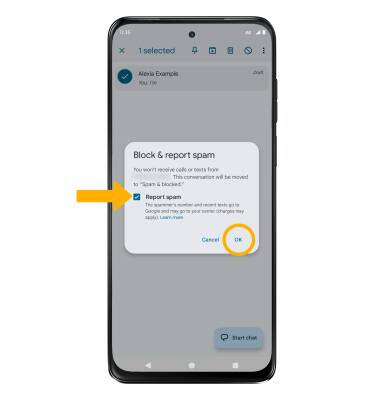
3. If desired, select the Report as spam checkbox to have the number reported to Google. Select OK to confirm.
Unblock messages
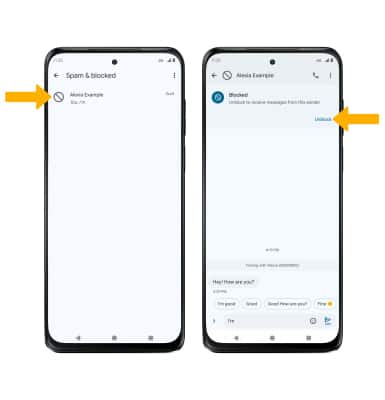
1. To remove a number from the Blocked numbers list, from the Messages app, select the Account icon then select Spam & blocked.
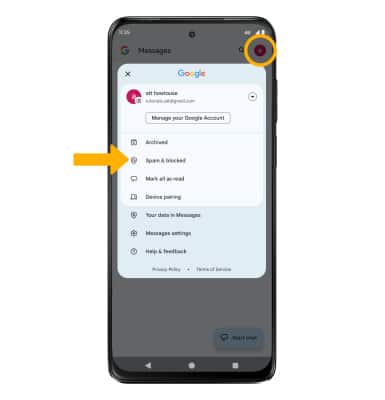
2. Select the desired message thread, then select Unblock.
Block unknown numbers
From the Spam & blocked screen, select the Menu icon then select Blocked numbers. Select the Unknown switch.
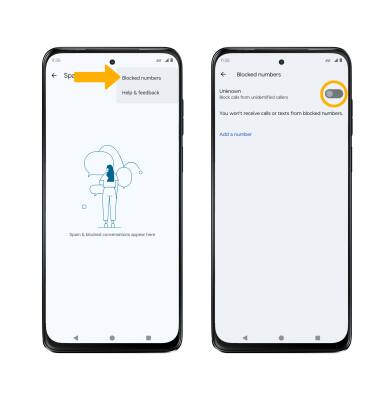
Menu icon then select Blocked numbers. Select the Unknown switch.