
In this tutorial, you will learn how to:
• Access accessibility features
• Access and enable vision options
• Access and enable hearing options
• Access and enable advanced settings
• Enable and use voice assistant
• Access Real-Time Text (RTT) settings
Access accessibility features
1. Swipe up from the bottom of the clock screen to access the Apps tray, then scroll to and select the  Settings app.
2. Scroll to and select Accessibility.
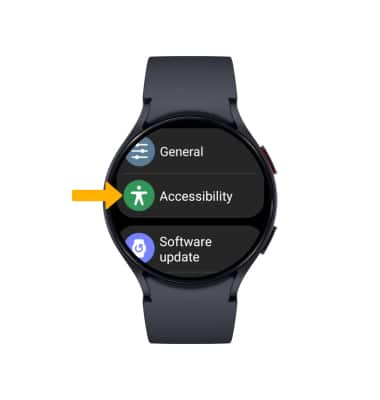
Settings app.2. Scroll to and select Accessibility.
Access and enable vision options
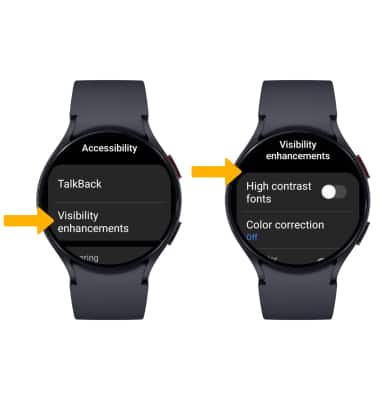
From the Accessibility screen, select Visibility enhancements. Vision accessibility features include Triple tap magnification, Font size, Color inversion and Color filters. Scroll to and select the desired vision feature or vision feature switch to enable or disable the feature.
Access and enable hearing options
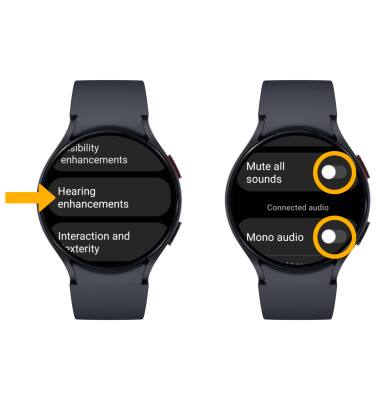
From the Accessibility screen, scroll and select Hearing enhancements. Scroll to and select the Mute all sounds switch to mute the device. Select the Mono audio switch to switch the audio to mono while using one earphone.
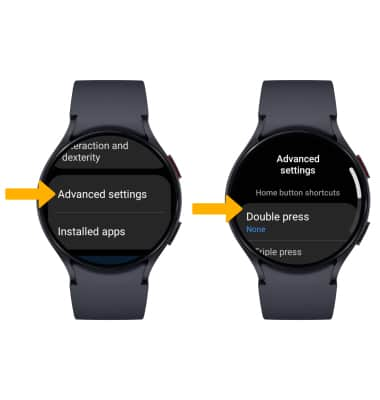
Access and enable advanced settings
From the Accessibility screen, scroll to and select Advanced settings. Select the desired feature to on or off.
Access and enable Voice Assistant
From the Accessibility screen, select TalkBack then select the TalkBack switch to place it in the On position.
Note: You will be prompted to select the Checkmark icon to confirm. To edit Talkback settings, from the TalkBack screen, scroll to and select Settings then edit TalkBack settings as desired. 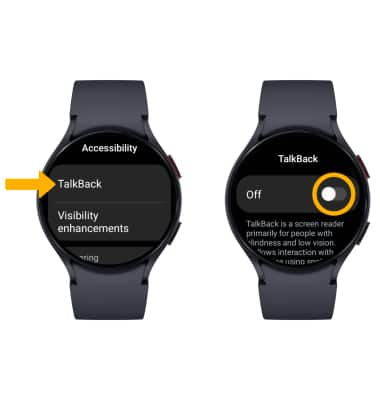
Access Real-Time Text (RTT) settings
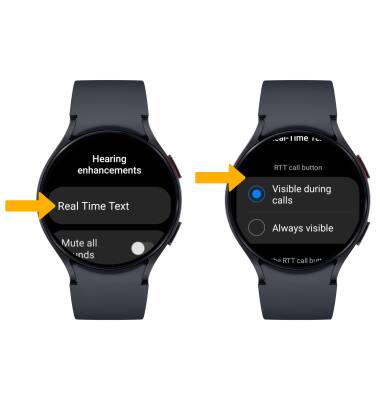
Real-Time Text (RTT) communication is a conversation of text and voice to make calls. As a sender types a message on their device, text displays on the receiving device. To access RTT settings, from the Hearing enhancements screen, select Real Time Text, then edit settings as desired.