 To access and use Bixby, you must have and be logged into a
 In this tutorial, you will learn how to:
• Access Bixby
• Customize Bixby
• Access Bixby settings
Access Bixby
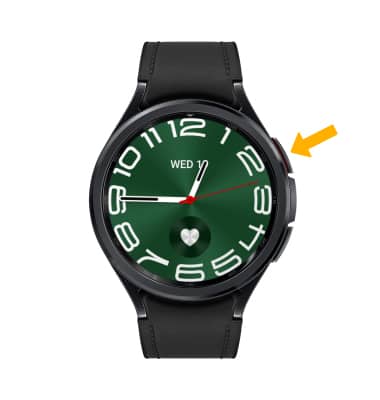
From the clock screen, press and hold the Home button.
Note: Alternately, swipe up from the bottom of the clock screen to access the Apps tray then scroll to and select the Bixby app. If this is your first-time accessing Bixby, you will be prompted to pick a voice style. Select the desired voice style, then follow the prompts.
Note: Alternately, swipe up from the bottom of the clock screen to access the Apps tray then scroll to and select the
Bixby app. If this is your first-time accessing Bixby, you will be prompted to pick a voice style. Select the desired voice style, then follow the prompts.
Customize Bixby
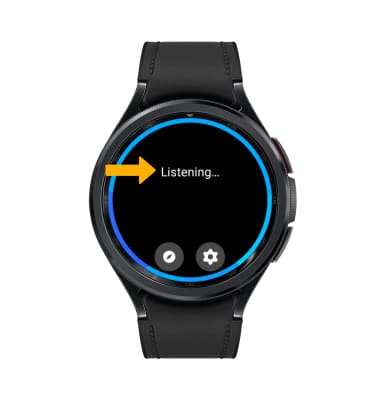
When Listening... is on screen, say "Hi, Bixby" to set up voice commands. Use the Bixby app to find food recommendations, upcoming scheduled appointments, reminders, emails, news, sports, weather, and more.
Access Bixby settings
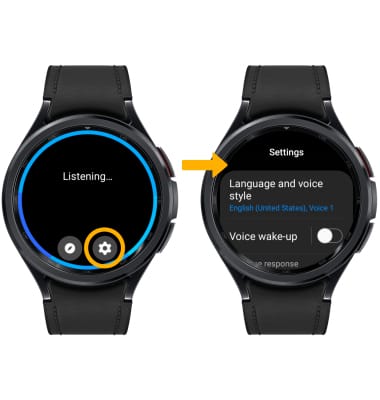
From the Bixby screen, select the settings icon, then edit settings as desired.