In this tutorial, you will learn how to:
• Access message settings
• Adjust notifications
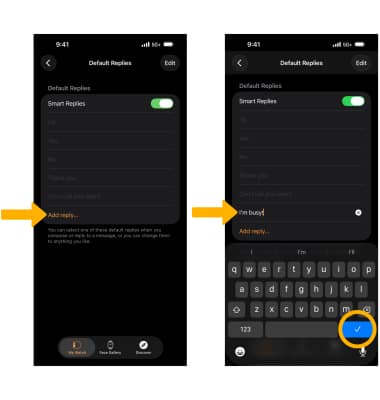
• Edit default replies
Access message settings
1. From the home screen of your paired iPhone, navigate to and select the  Watch app.
Note: Your message settings will mirror your paired iPhone message settings by default. This tutorial demonstrates how to manually edit your message settings.
2. Scroll to and select Messages. 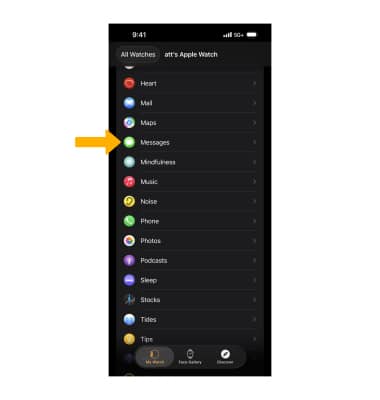
Adjust notifications
From the Messages settings screen, select Custom then select the desired notification option. 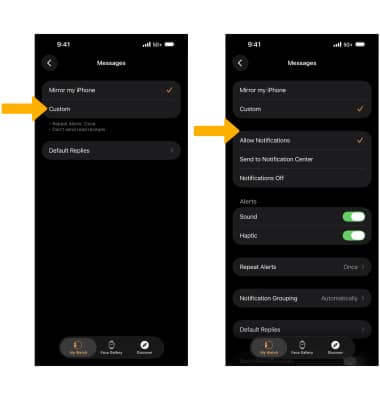
Edit default replies
1. Select Default Replies. 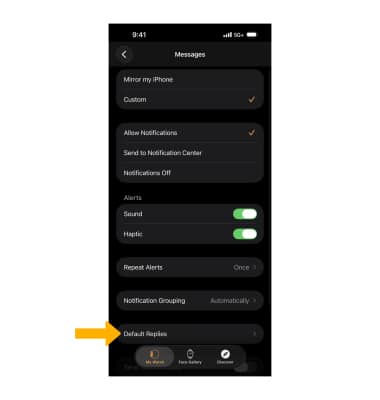
2. To remove a default reply select Edit. Select the Remove icon next to the desired option, then select Delete. When finished, select Checkmark icon.
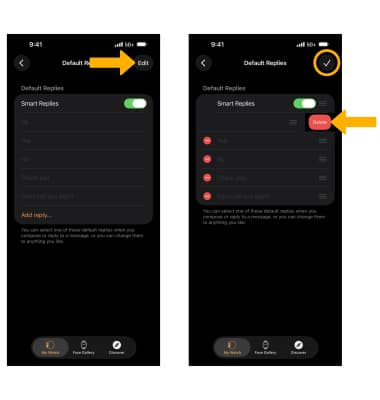
3. To add a default reply scroll to and select Add reply... Enter the desired reply, then select Checkmark icon.