In this tutorial, you will learn how to:
• Access camera settings
• Change the picture size
• Turn the flash on or off
• Set the timer
• Use the Palm timer
• Edit camera and mic access
Access camera settings
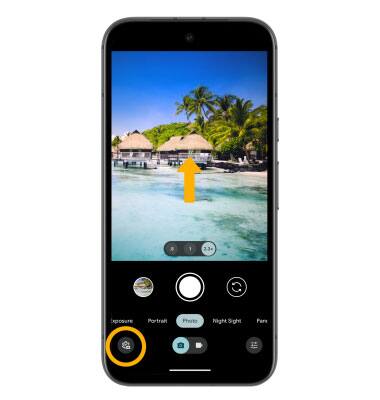
From the home screen, select the  Camera app, then swipe up from the middle of the screen or select the Camera settings icon.
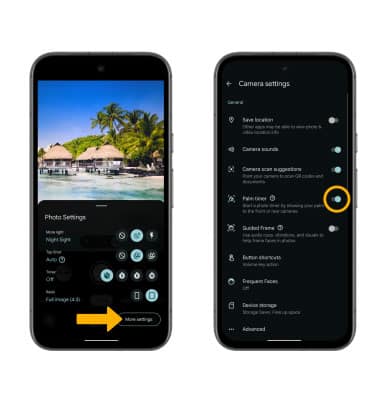
Note: To access additional camera settings such as Palm Timer, Ultra HDR and more, from the camera settings menu, select More settings.
Change the picture size
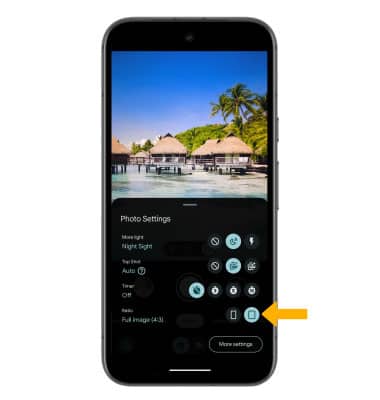
From the camera settings menu, select the desired ratio.
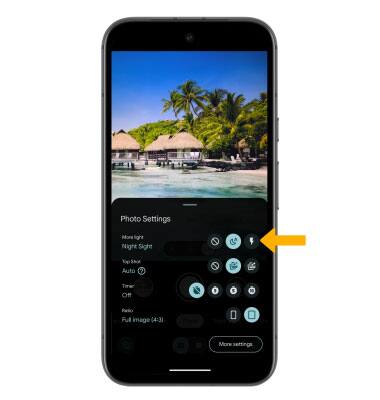
Turn the flash on or off
From the camera settings menu, select the desired flash option.
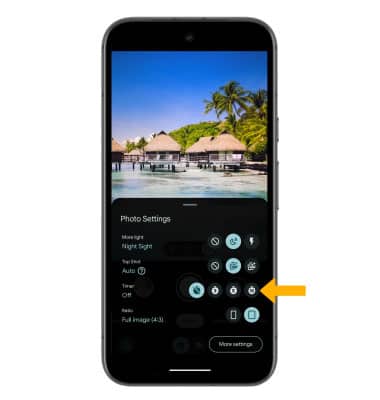
Set the timer
From the camera settings menu, select the desired time.
Use the Palm timer
From the camera settings menu, select More settings then select the Palm timer switch.
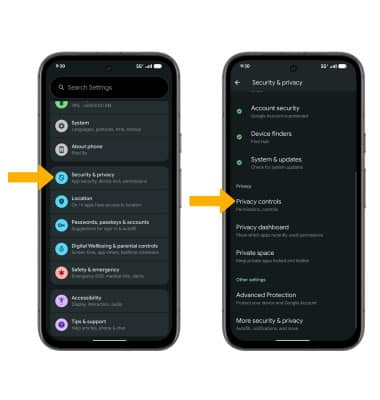
Edit camera and mic access
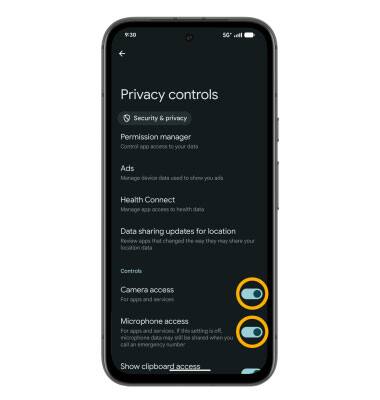
1. Swipe down from the Notification bar with two fingers, then select the  Settings icon. Scroll to and select Security & privacy then scroll to and select Privacy controls.
2. Select the Camera access switch or the Microphone access switch to enable or disable as desired.