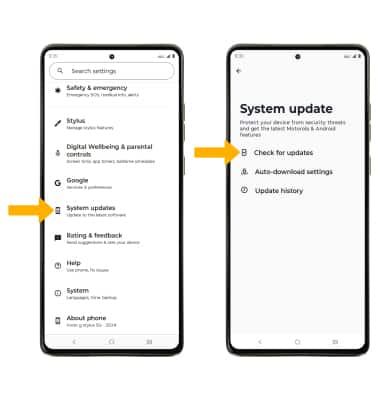
 The images and steps in this tutorial reflect the latest software version (Android 15). Stay current by regularly checking for software updates, which often include important security patches and performance enhancements. Use the
 In this tutorial, you will learn how to:
• View software version
• Check for updates
• Check for updates
View software version
1. Swipe down from the Notification bar with two fingers, then select the  Settings icon.
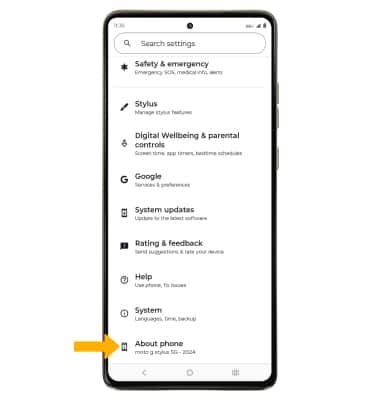
Settings icon.2. Scroll to and select About phone.
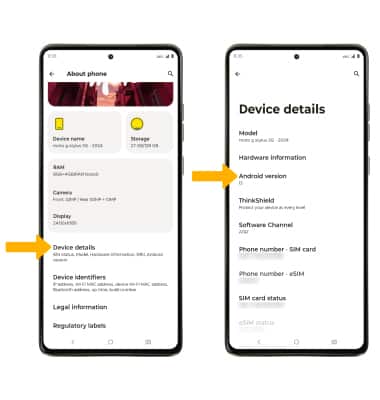
3. Scroll to and select Devices details, then select Android version.
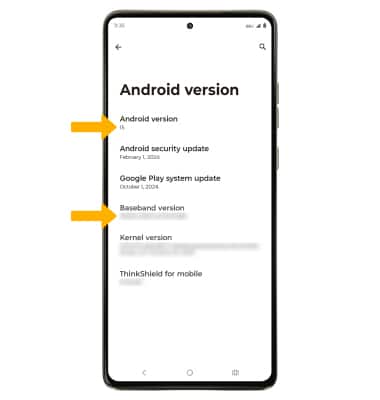
4. Here you can view the Android version and the Baseband version.
Check for updates
From the Settings screen, scroll to and select System updates, then select Check for updates.
Note: If an update is available, follow the on-screen instructions to perform the update. If an update is not available, select Got it.
Note: If an update is available, follow the on-screen instructions to perform the update. If an update is not available, select Got it.