
In this tutorial, you will learn how to:
• Connect devices to Wi-Fi
• Activate Screen Sharing
• Turn off Screen Sharing
• Activate Screen Sharing
• Turn off Screen Sharing
Connect devices to Wi-Fi
1. Swipe down from the Notification bar, then select and hold the  Wi-Fi icon.
Wi-Fi icon.2. Select the Wi-Fi switch to turn Wi-Fi on, then select the desired Wi-Fi network.
Note: If necessary, enter the Password then select Connect. If you need further assistance connecting to Wi-Fi, visit the Wi-Fi tutorial.
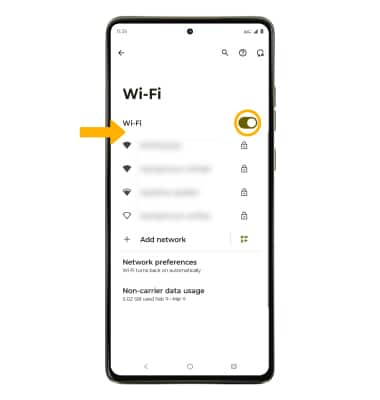
Note: If necessary, enter the Password then select Connect. If you need further assistance connecting to Wi-Fi, visit the Wi-Fi tutorial.
Activate Screen Sharing
1. Swipe down from the Notification bar with two fingers, then select the  Settings icon.
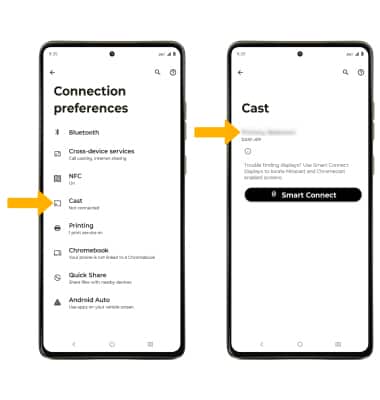
Settings icon.2. Select Connected devices, then select Connection preferences.
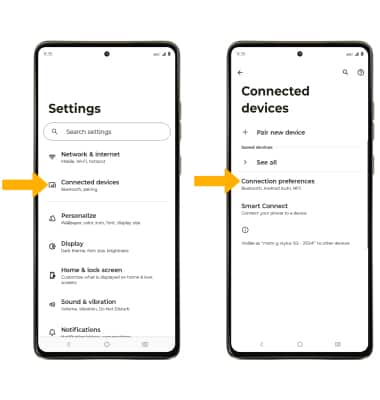
3. Select Cast, then select the desired device.
Note: Select the drop-down to select A single app or Entire screen, then select Start casting. You can also turn Screen Sharing on or off through Expanded Quick Settings. Swipe down from the notification bar with two fingers then swipe left. Select Screen Cast to quickly turn screen sharing on or off.
4. When Casting your screen, the Cast icon will be displayed in the Notification bar.
Note: Select the drop-down to select A single app or Entire screen, then select Start casting. You can also turn Screen Sharing on or off through Expanded Quick Settings. Swipe down from the notification bar with two fingers then swipe left. Select Screen Cast to quickly turn screen sharing on or off.
4. When Casting your screen, the
Cast icon will be displayed in the Notification bar.
Turn off Screen Sharing
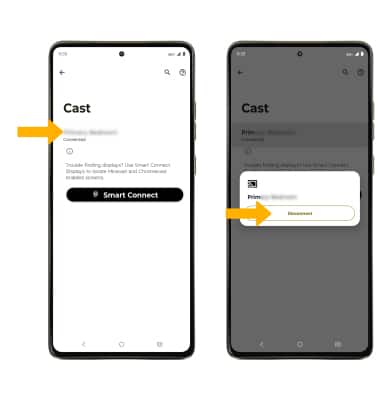
From the Cast screen, select the desired connected device then select Disconnect.